

Want your text messages to feel less like anonymous blasts and more like 1:1 conversations? Personalized text messages let you do exactly that using the data you already collect – names, locations, interests, donation history, event attendance, and more. With the right software, you can turn that data into higher response rates, better conversions, and stronger relationships at scale.
In this guide, you’ll see what personalized text messages are (and how they differ from “personal” texts), how to set things up in CallHub, and real examples you can adapt for your own campaigns.
Personal vs. personalized text messages
A personal text message is about tone and the way the conversation feels. It sounds like a real person talking to another person, not a robot or a broadcast.
A personalized text message is about content. It uses specific details about your contact – like their name, city, donation amount, or last event – to tailor the message to them.
Example: You’re helping a voter plan their election day.
- A personal message might say: “Hey! Got a minute to talk through your plan to vote?”
- A personalized message would say: “Hi Alex, your polling station at 14th Street Community Center opens at 7 AM tomorrow. Do you have a plan to get there?”
The best campaigns use both: a personal tone plus personalized details. Peer-to-peer texting in CallHub is built for this – agents have 1:1 conversations while still using personalized data through merge tags and custom fields.
What does this mean when talking to contacts?
Mass texting allows you to send personalized messages to contacts. You can schedule a mass text to go out, and it will autofill with each contact’s details, as long as you have them in your database.
Peer-to-peer texting lets you have both personalized and personal conversations with contacts. Texting agents engage contacts in 1-to-1 conversations. The tradeoff is that the scale of your texting campaign is limited by the number of agents you have.
Why personalized text messages work
Personalized text messages work because they:
- Use details that show the message is meant specifically for the recipient
- Arrive on a channel that people check constantly
- Make the next step obvious and relevant
Industry research highlights why personalization is now the default expectation:
- Around 78–80% of consumers say they are more likely to purchase or take action when messages are personalized.
- About 54% of organizations already use customer data to tailor SMS, and they see engagement lift by up to 30% versus generic sends.
If your texts don’t feel personal, your audience will likely engage with someone else who’s doing it better.
Why must it be easy to implement?
When you’re sending a text message to a large list of contacts, you’re not going to have the time to personalize them individually.
Make sure your texting provider lets you:
- Use merge tags to personalize texts
Merge tags help you to customize your message by adding dynamic fields like the first name, email address, phone number, address, or any details that are collected and added in the contacts for your campaign.
You can use any standard field or custom field as a merge tag in CallHub, so details collected via forms, imports, or text-to-join campaigns automatically become available for personalization across broadcasts, P2P, and automated flows.
- Rent a local number
People are more inclined to trust texts from numbers based in their own region. In CallHub, SMS numbers can be manually rented from the “Numbers” section of the dashboard. You need to navigate to Numbers>Texting>Rent and choose the area code.
Depending on your region and campaign type, you can also rent 10DLC, toll-free, or shortcode numbers and associate them with registered messaging campaigns for better deliverability and compliance.
- Reply to your contacts
People are highly likely to respond to the text messages they receive. Avoid leaving them hanging by replying.
You should be able to send one-to-one text replies or set up automatic responses with your texting software.
In CallHub, you can handle replies in real time through two-way and peer-to-peer texting, and set up keyword-based auto-replies (like YES/NO/INFO) or full text-to-join flows that both respond and update contact records automatically.
Watch for more ways you can make your SMS marketing more engaging:
Here’s how you can personalize mass texts and peer-to-peer texts with CallHub:
How to personalize your text messages with CallHub
1. Set up
Collecting information for future personalization
It goes without saying that you need to have your contact data in your database before being able to personalize text messages.
What kind of data should you collect? Here’s the key information that every campaign should have:
- Contact first name and last name
- Contact mobile and landline numbers
- Contact’s email address
- Contact’s address (city, country)
Further data to collect depends on the objectives of your campaign.
Ex. If you’re running a campaign to thank people for donating, you can populate donation sums into your database.
This data can be added to CallHub as custom fields that can be used to personalize your text messages.
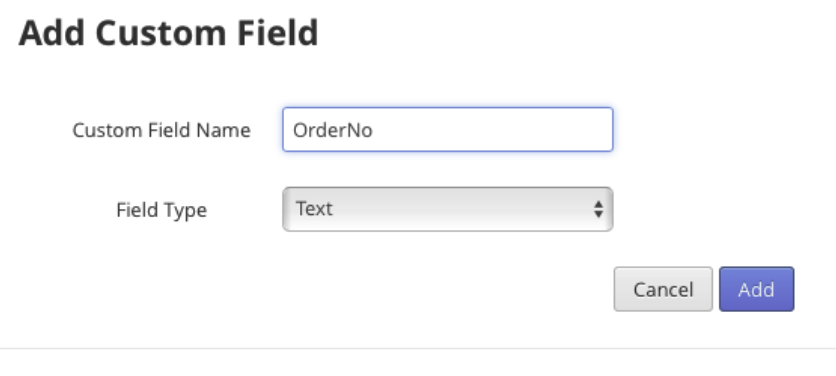
Custom fields are the new fields that can be defined by the user to add additional data to your Contact, along with the regular fields provided by CallHub.
CallHubs’ default custom fields are:
- [first_name]
- [last_name
- [mobile_number]
- [phone_number]
- [email]
- country]
- [city]
How do you collect data?
There are several ways to collect data from contacts.
- Website forms and landing pages
- Event sign-up or registration forms
- Integrated CRMs and donor databases
- Text opt-in campaigns and SMS keywords (e.g., “Text JOIN to …”)
- Text surveys run through CallHub (responses saved into custom fields)
In SMS Opt-in campaigns, contacts text into a number using a keyword to get added to your contact list. Automated texts are sent once they opt in to collect further data.
The more thoughtfully you collect data, the more relevant your future messages can be.
Read Also: Here’s How To Use Opt-In Text Messaging For Your Advantage
Segmenting contact lists based on collected data
Once you have data, you can segment your contact list. The more you segment, the more personal you can be.
Some segment examples:
- Contacts interested in a particular issue or program
- Major donors vs small donors
- New subscribers vs long-time supporters
- Contacts in a specific city or ward
This segmentation can be done wherever you have your contacts and their details stored i.e. in an excel sheet, or your CRM, before importing them into CallHub.
Importing them as contact lists in CallHub
Once you’ve collected and segmented your contacts, you can import them into CallHub. During import, map your columns to the right fields:
- Name, phone numbers, email
- Address details
- Custom fields (donation amount, last event, membership type, etc.)
- Tags if they’re included in your file
After import, all of this becomes available for personalization in CallHub: you can use custom fields in merge tags, filter by them in campaigns, and reference them in automation flows.
There are two ways to do this:
- Upload a csv. File of your contact list into CallHub

- Integrate your CRM with CallHub to import contact lists
Read Also: App Integrations | Connect CallHub with any CRM you use
2. Outreach
- How do you personalize your text messages?
Merge tags remain the simplest way to personalize your message in any CallHub campaign. They allow you to insert data from custom fields directly into text templates. Each tag is replaced with the contact’s actual information when the message is sent.

The merge tags are replaced with each contact’s unique details before the texts are delivered.
Merge tags can be added to your mass texts, peer-to-peer texts and even your call center campaign scripts.
In a mass texting campaign,
- A campaign manager uploads a contact list.
- Creates a text broadcast campaign targeting that list.
- Drafts a text message, personalizing it with merge tags like {first-name}.
Read Also: The Future of Mass Texting: Trends, Technology, And More
In a peer-to-peer-texting campaign,
- A campaign manager uploads a contact list.
- Assign a batch of contacts to each agent.
- Agents then reach out and engage people in one-to-one conversations.
Each agent can send out around 3500 personalized text messages in the span of an hour, with data collected from conversations instantly syncing with your CRM.
3. Follow ups
The ability to follow-up with contacts makes texting a lot more personal.
For a mass texting campaign, you can enable automated replies to go out based on a keyword.

That means different messages can go out depending on the response that contacts give.
Read Also: Here is How to send automated texts in 2025
For peer-to-peer texting campaigns, agents can choose from text message templates predefined by the campaign manager, or send one of their own.

Personalized text messages dos and don’ts
Here are a few best practices to follow when sending personalized text messages:
Do
- Find the right tone for messages through A/B testing.
- Introduce yourself and your organization in the first message.
- Use a local number for your texting campaigns when possible.
- Follow up with contacts who say “maybe” or show interest.
- Send quick replies in peer-to-peer conversations.
- Record data from your text conversations (notes, tags, updated fields).
- Make it easier for agents with saved replies that still use merge tags.
Don’t
- Overwhelm contacts with too many messages.
- Use sensitive personal information in a way that feels invasive.
- Send messages without clear opt-in and opt-out options.
- Forget to test your merge tags before sending.
With A2P 10DLC and increasing focus on compliance, make sure you:
- Register your campaigns and numbers where required.
- Clearly identify your organization.
- Honor STOP and other opt-out keywords immediately.
Personalized text message examples
Here are a few example patterns you can adapt with your own data.
Event reminder
“Hi {{first_name}}, this is {{org_name}}. Your event ‘{{event_name}}’ is tomorrow at {{event_time}} at {{event_location}}. Reply YES to confirm or NO if you can’t make it.”
Donation impact
“Hi {{first_name}}, your last gift of {{last_donation_amount}} helped us {{impact_statement}} in {{city}}. Can we count on your support again this month?”
Appointment reminder
“Hi {{first_name}}, this is {{clinic_name}} reminding you of your appointment on {{appointment_date}} at {{appointment_time}}. Reply 1 to confirm or 2 to reschedule.”
GOTV
“Hi {{first_name}}, it’s {{campaign_name}}. Your polling station at {{polling_location}} is open from {{polling_hours}} tomorrow. Reply YES if you plan to vote.”
These templates come to life when you plug in real data from your custom fields and segments.
Fina thoughts: personalized text messages
You don’t need a perfect database to get started. Begin with the basics—name, city, one or two key fields—and build from there.
CallHub’s custom fields, merge tags, segments, P2P texting, and automation features give you everything you need to turn that data into messages that feel human, not robotic.
Ready to see it in action? Create your CallHub account, import your contacts, and launch your first personalized texting campaign today.
FAQs on personalized text messages
What are personalized text messages?
Personalized text messages are SMS that use contact data such as name, location, past actions, or preferences to tailor the content for each recipient, instead of sending the exact same message to everyone.
How do I send personalized mass text messages?
To send personalized mass texts, you import contacts with key fields (like first name and city), set up custom fields, insert merge tags into your SMS template (for example, [first_name], and then send to your selected segment so each person receives a customized version.
What data do I need to personalize my text messages?
Start with basic fields such as first name, location, and one or two campaign-specific fields like last purchase, last donation, or upcoming event, then expand as your personalization strategy matures.
How can I personalize texts at scale but still handle replies like real conversations?
Use a platform that supports merge tags and segmentation for the initial send, and then offers two-way or peer-to-peer texting so agents (or teams) can answer replies individually while still seeing each contact’s data.
Are personalized text messages compliant, and what consent do I need?
Personalized SMS can be fully compliant as long as you obtain clear opt-in, include easy opt-out options (like STOP), and follow local regulations such as TCPA and carrier rules for A2P messaging.