

WORKFLOW AUTOMATION
Run campaigns that keep moving, without manual work
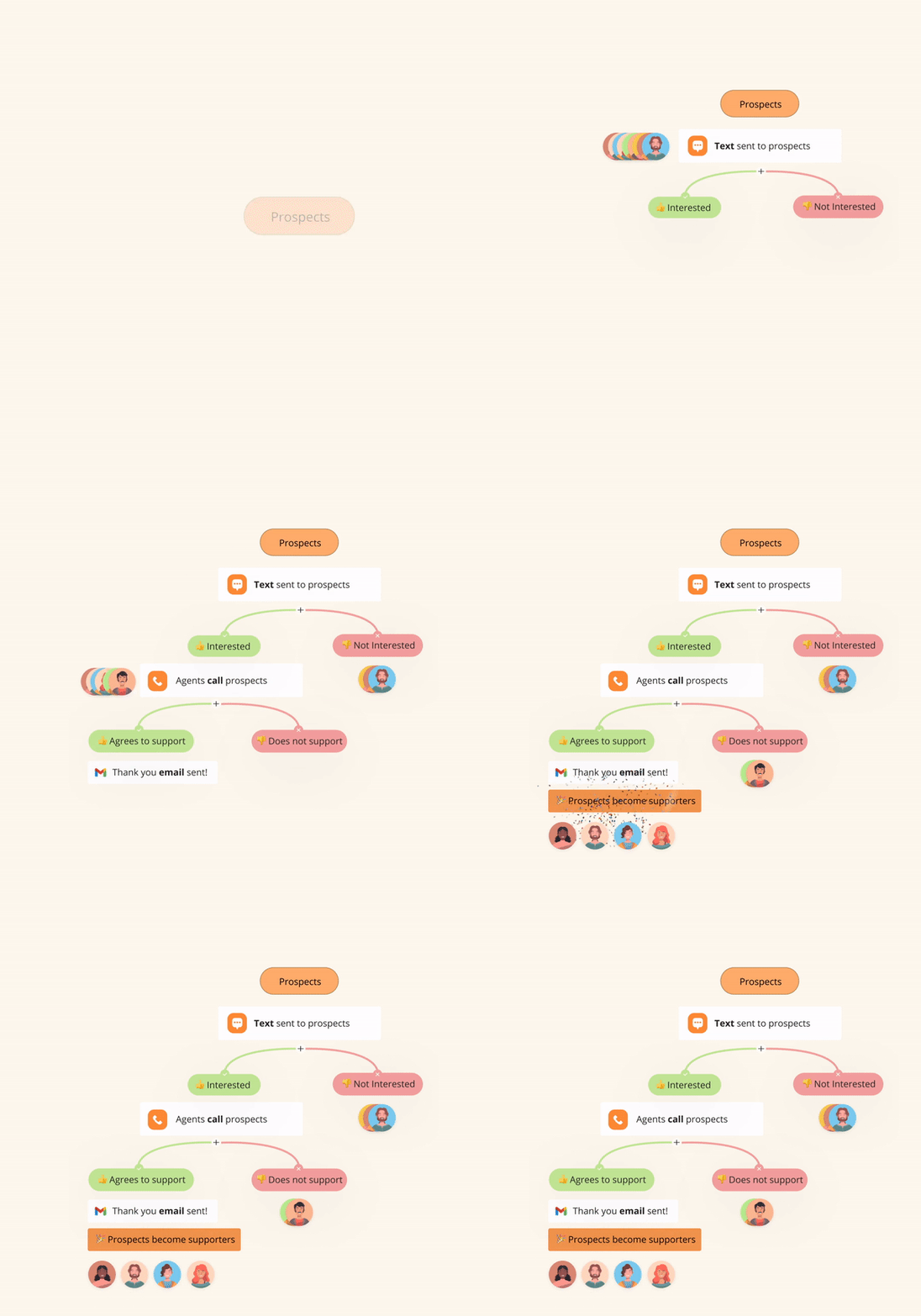
Build the sequence once: who gets called, who gets texted, who gets an email, and what happens next based on how they respond. The workflow handles the rest.
- ✓ No contacts get missed between channels
- ✓ Follow up with contacts at the right time, automatically
- ✓ 87% less manual list work with behavior-driven flows
Trusted by 200K+ organizations around the world






THE PROBLEM
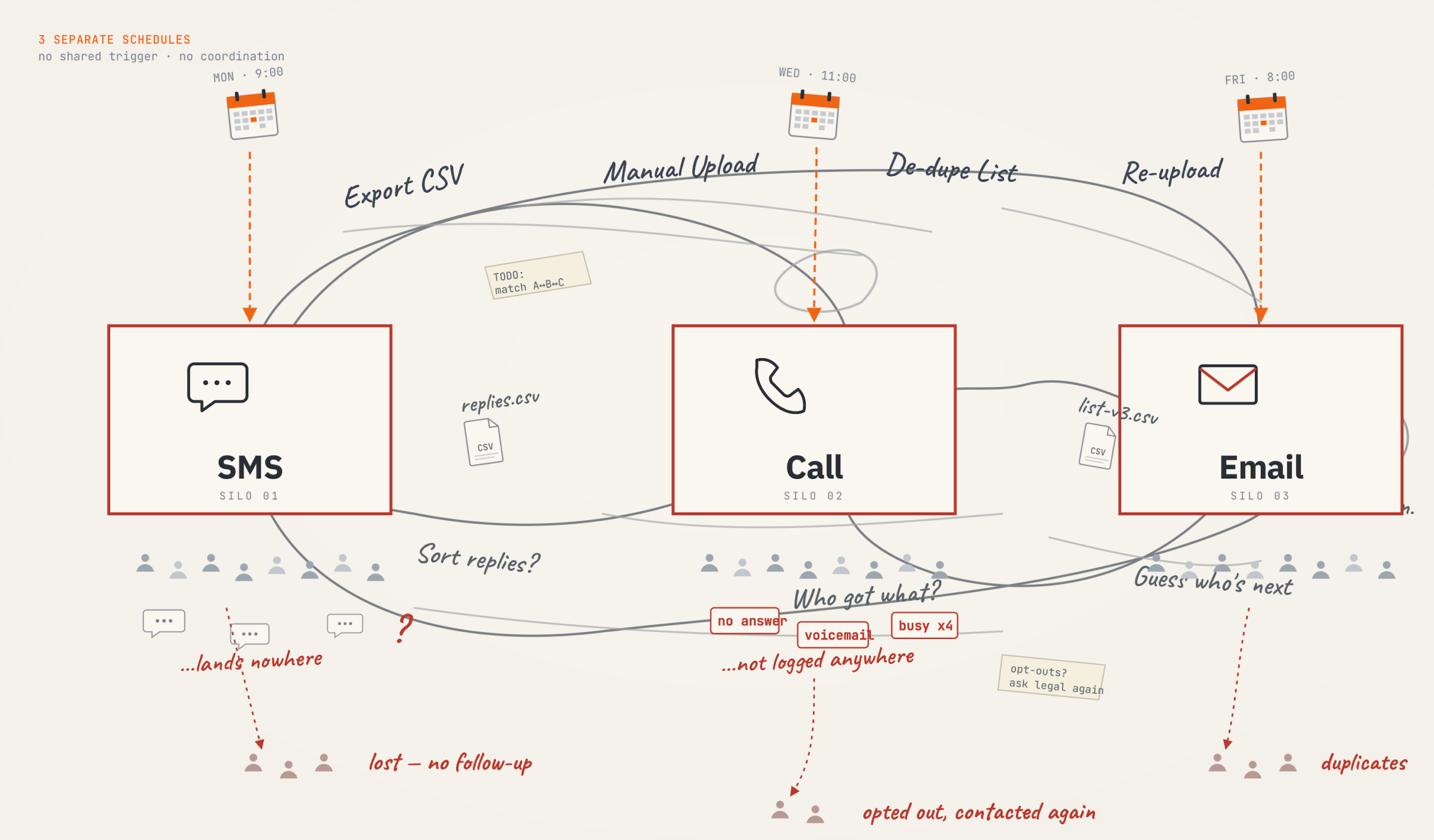
You’re running three campaigns. Not one.
When every channel is a separate tool with a separate list, the gap between them is where supporters disappear.
Someone responds to a text, but the call team doesn't know. The moment is gone and the contact disengages.
A contact who doesn't pick up stays on the list indefinitely, or disappears entirely when you move to another channel.
Every campaign means exporting, sorting and uploading the same data. One minute of extra admin work on a list of 20K people means 300+ hours of wasted time.
THE SOLUTION
Most tools give you channels. CallHub unifies all channels into one campaign
The difference shows up in the results.
Measured across campaigns on CallHub vs industry benchmarks for fragmented outreach platforms
HOW IT WORKS
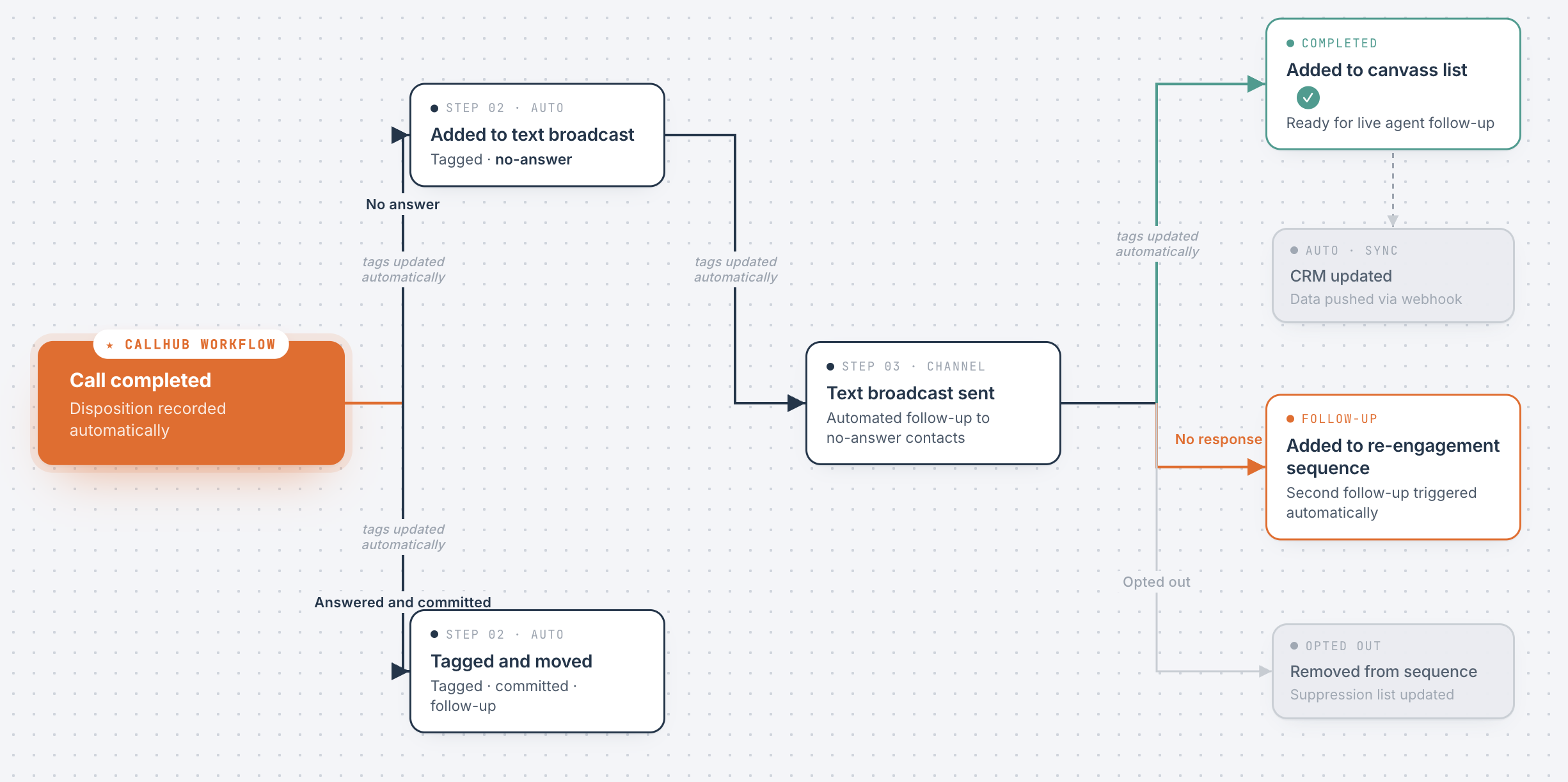
Campaigns working in one flow vs. three separate tools
Contact behavior determines what happens next. Every disposition, reply, and click fires the next step automatically, with no one rebuilding a list between channels.
FEATURES
Workflow automation tools built for behavior-driven outreach
Every feature eliminates the manual work between your channels and connects directly to the unified outreach flow.
Trigger follow-up campaigns automatically based on call disposition, survey response, or tag.
Build and visualise your entire contact journey on one canvas before you launch.
Route each contact to the next step based on their actual response or disposition.
Add a delay of hours or days between steps so follow-ups land at the right moment and not overwhelm contacts.
Every workflow outcome updates contacts in NationBuilder, NGP VAN, Salesforce, or any other CRM that you may be using.
See how many contacts enter each branch, where are they converting and where are they dropping off so you can optimize campaigns in time.
Built for the tools you already use. Certified for the standards you're accountable to.
Two-way sync with the tools your campaign already runs on.

Every major security and compliance standard. Built in, not bolted on.


Ready to run a campaign that moves ahead automatically?
Book a 30-minute session and see how a behavior-driven workflow maps to your existing outreach program.

USE CASES
Workflow automation for every campaign driven by action
Whether you’re running political campaigns, nonprofit programs, advocacy mobilizations, or union drives, workflows move contacts from first touch to committed action automatically.

Move voters from identified to committed across channels, without rebuilding a list.
- Route non-answers into follow-up text automatically
- Move voters who commit out of call queue
- Trigger GOTV reminders based on prior engagement
- Branch on call disposition for the right follow-up script

Small teams handle donor and volunteer follow-up without managing three separate processes.
- Re-engage lapsed donors after a missed call
- Move event RSVPs into a confirmation call queue
- Route donors by response for personalized follow-up
- Trigger volunteer sequences based on survey answers

Pre-build the full activation sequence so when the window opens, the campaign is already running.
- Trigger patch-through calls from petition sign-ups
- Route rapid-response contacts by issue survey answers
- Add non-responders to secondary outreach automatically
- Move activated supporters into a phone bank queue

Coordinated outreach ensures no member gets the same message twice across channels.
- Route missed calls into a text follow-up next morning
- Trigger mobilization sequences from ratification survey
- Add non-responders to re-engagement list automatically
- Branch on disposition to update member CRM records
WHAT CHANGES
When workflow automation is part of a unified campaign
Right now, your outreach routing depends on someone remembering to do it. Here is what it looks like when the campaign does it for you.
TESTIMONIALS
Hear from organizations winning with unified outreach
We couldn't have hit our goals without CallHub. Even more, CallHub could handle our small program needs across all channels — from texting 5 people to calling 5 million, we could trust CallHub.
"CallHub has become my go-to platform for affordable phone canvassing campaigns, voice broadcasts and text message blasts. In particular, text message blasts are the single most useful tool for volunteer mobilization that I have used in recent years."
"CallHub gave us the ability to reach our supporters quickly and efficiently. The platform's reliability during our most critical outreach moments made a real difference in our campaign's results."
See how automated workflows can drive more impact
Book a 30-minute session. We’ll show you exactly how a behavior-driven workflow maps to your existing outreach, which triggers, conditions, and actions fit your program.
FAQs
What is workflow automation in CallHub?
CallHub workflow automation is a visual builder that connects your campaigns into a single automated sequence. You set a trigger (such as a call being completed), add conditions (such as what the call disposition was), and define actions (such as adding the contact to a follow-up text broadcast or tagging them for a different campaign). Once published, the workflow runs automatically as contacts move through it. No manual list exports. No rebuilding between steps.
What triggers are available in a CallHub workflow?
You can trigger a workflow from any of the following events: tag added, tag removed, call completed, outreach completed, initial message sent, message received, link clicked, or suggested action clicked. Each trigger fires automatically when that event occurs for a contact, starting the automation from that point.
What conditions can I set inside a workflow?
You can add two types of conditions. A Wait condition delays the next step by a set number of days, hours, or minutes. An If/Else condition branches the workflow based on a contact’s tag, survey response, call retry attempts, call disposition, message response, link clicked, or transfer digit pressed. Conditions can be layered so contacts follow the path that matches what they actually did.
What actions can a workflow perform?
When a condition is met, the workflow can: add the contact to a campaign, add the contact to a contact list, add a tag, remove a tag, or send data to an external system via webhook. Actions are the end result of the workflow logic and execute automatically without any manual input once the workflow is published.
Do I need technical skills to build a workflow?
No. The workflow builder is a visual canvas where you drag in triggers, conditions, and actions and connect them in the order you want. You can see the entire contact journey laid out before you publish. It is recommended to sketch out your logic as a flowchart first so the conditions are placed correctly, but no coding or developer support is needed.
Can a workflow update my CRM automatically?
Yes. CallHub supports webhook actions within a workflow. You can configure a webhook to send contact data to NationBuilder, NGPVAN, Blackbaud, Action Network, Salesforce, PDI, and other systems at any step in the sequence. Contact records update without anyone manually exporting data.
Can one contact enter the same workflow more than once?
By default, a contact enters a workflow only once. This is noted in the builder when you set your trigger. If your campaign requires re-entry, you will need to configure a separate workflow or use the contact re-entry settings. CallHub’s support documentation covers the available options for contact entry and re-entry in workflows.
How is workflow automation different from just running multiple campaigns separately?
When campaigns run separately, someone has to manually move contacts between them based on what happened in each one. Workflow automation removes that manual step. The moment a call is completed with a specific disposition, the contact is automatically added to the right next campaign, tagged appropriately, or routed into a wait period before the next action. The sequence runs itself. Your team focuses on the conversations, not the logistics.
Can I reuse a workflow across multiple campaigns?
Yes. Once a workflow is built, it can be saved and reused. This reduces setup time significantly for recurring campaign types like GOTV, annual fundraising appeals, or membership renewal drives. You update the specific campaign references within the template and launch without rebuilding the logic from scratch.
How do I know how many contacts are moving through a workflow?
CallHub provides workflow reports that show how contacts are progressing through each step. You can see how many unique contacts have entered the workflow and track where they are in the sequence. This gives you a live view of which branches are being triggered and where contacts are landing as the campaign runs.