

Workflow automation that keeps your campaign moving without manual work
Workflow automation lets you build a campaign sequence once, and it runs on its own.
Triggers, if/else rules and wait times send each contact to the right call, text or email, so no one gets missed and your team spends less time on manual list work.



Designed to run your outreach without manual work
Tools that help you build a sequence once and let it send every contact to the right next step.
Drag-and-drop builder
Drag in triggers, conditions and actions and see the entire contact journey before you launch, with no coding.
If/else logic
Routes contacts by their tag, survey answer, call result or reply, so each person follows the path that matches what they did.
Wait conditions
Adds a delay of minutes, hours or days between steps, so follow-ups land at the right time and don’t overwhelm contacts.
Reusable workflows
Save a workflow as a template and reuse it next cycle, so you don’t rebuild the logic every time.
Automatic follow-ups
Starts a follow-up campaign automatically from a call result, survey answer, tag or reply.
Live CRM updates
Sends workflow outcomes to NationBuilder, NGP VAN, Salesforce or another CRM as they happen, so no one exports data by hand.
Workflow reports
Shows how many contacts reach each step and where they drop off, so you can improve the campaign while there’s still time.

From trigger to follow-up in four steps
Watch a workflow being built
Pick a trigger
Start from an event, like a call completed or a tag added.
Add conditions
Use wait times and if/else rules to branch each contact.
Choose actions
Add the contact to a campaign or list, tag them, or send data to your CRM.
Publish
The workflow runs on its own as contacts move through it.
See workflow automation built for your campaign
Book a 30 minute session and we’ll map the triggers, conditions and actions that fit your program.
Book a Demo

Workflow automation for every team that runs follow-ups
Move contacts from first touch to committed action, without rebuilding a list between steps.
Advocacy organizations
- Trigger patch-through calls from petition sign-ups
- Route rapid-response contacts by survey answer
- Move activated supporters into a phone bank queue
Nonprofits
- Win back lapsed donors after a missed call
- Move event RSVPs into a confirmation call queue
- Trigger volunteer sequences from survey answers
Unions
- Route missed calls into a next-morning text
- Trigger mobilization from a ratification survey
- Update member records by call result
Political campaigns
- Route non-answers into a follow-up text
- Move committed voters out of the call queue
- Trigger get-out-the-vote reminders from past activity
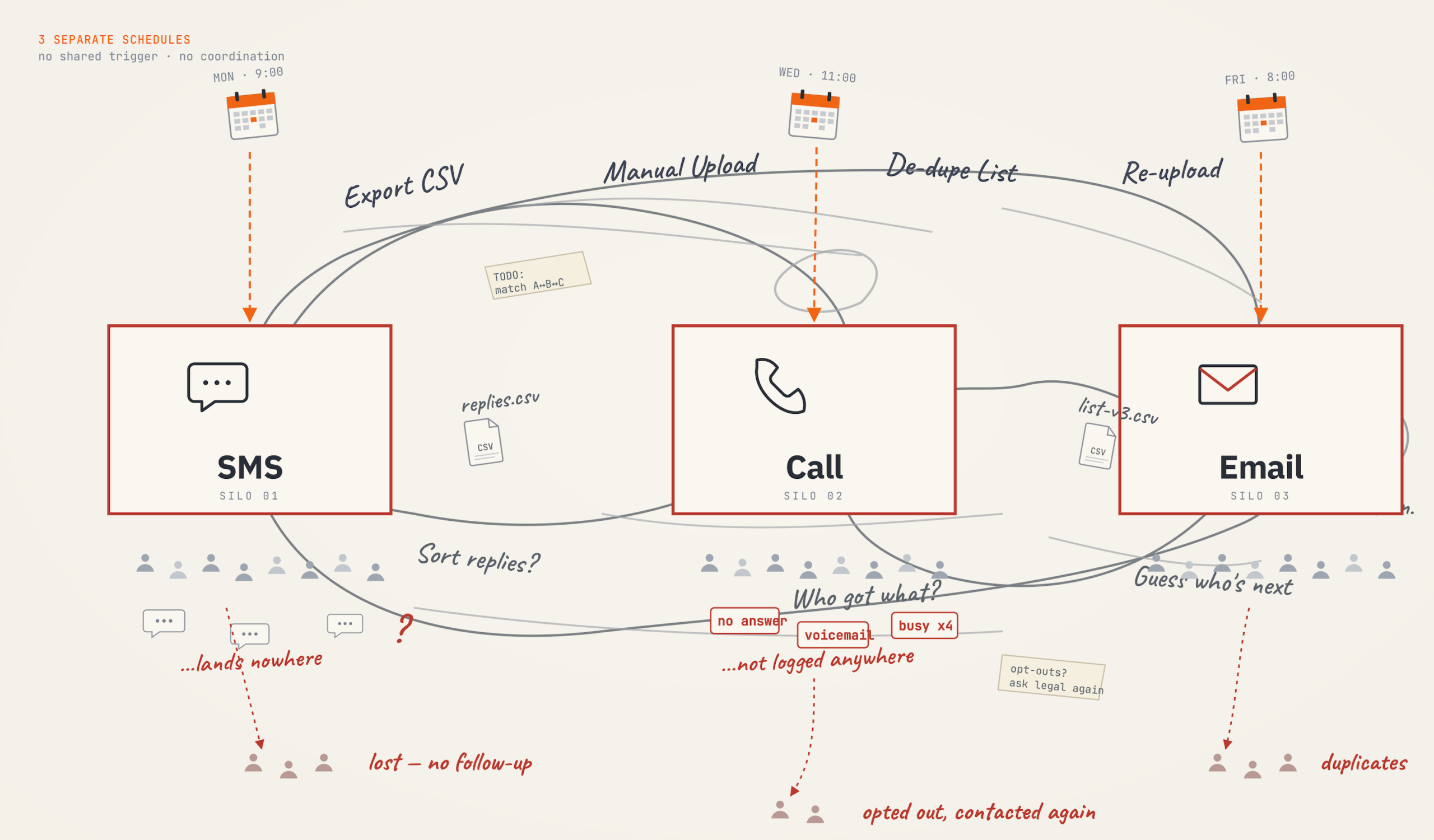
Workflow automation in a unified flow, not three separate tools
A workflow connects your calls, texts and emails into one campaign. Each contact’s response decides what happens next, so no one rebuilds a list between channels.
Hear from organizations winning with CallHub
Ready to run a campaign that moves on its own?
Book a 30 minute session and we’ll show you how a workflow would run your next outreach program.
Questions about workflow automation
Workflow automation software lets you set up rules once, so tasks run on their own. In outreach, it sends each contact to the next call, text or email based on how they respond.
CallHub workflow automation is a visual builder that connects your campaigns into one automated sequence. You set a trigger, add conditions and define actions. Once you publish it, the workflow runs on its own as contacts move through it.
Multi-channel automation connects your calls, texts and emails, so a contact’s response in one channel decides what they get next in another. In CallHub, you build that sequence once in the workflow builder.
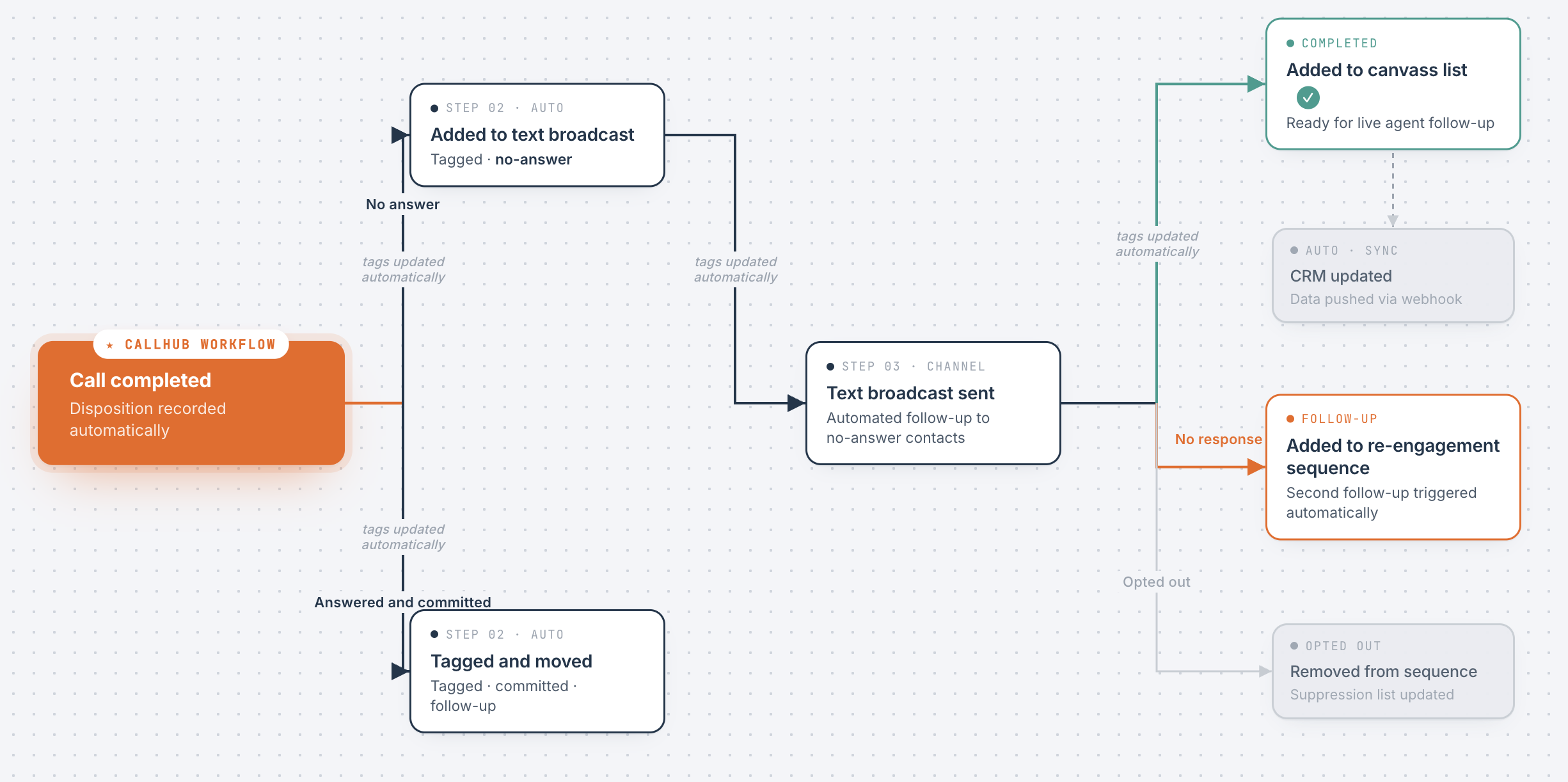
When a call is completed, a workflow checks whether it was answered. If not, it waits a day and sends a follow-up text. If it was, it tags the contact “Interested” and adds them to your call-back list.
A tag added or removed, a call completed, outreach completed, an initial message sent, a message received, a link clicked, or a suggested action clicked. Each trigger fires automatically when it happens for a contact.
A wait condition delays the next step by minutes, hours or days. An if/else condition branches by a contact’s tag, survey response, call retry attempts, call disposition, message response, link clicked or transfer digit pressed.
It can add the contact to a campaign or a contact list, add or remove a tag, or send data to an external system with a webhook.
No. You drag triggers, conditions and actions onto a visual canvas and connect them. You see the whole contact journey before you publish. It helps to sketch your logic as a flowchart first.
Yes. A webhook action can send contact data to NationBuilder, NGP VAN, Blackbaud, Action Network, Salesforce and other systems at any step, so records update without manual exports.
Yes. A webhook action sends contact data to an external system at any step in your workflow.
By default, a contact enters a workflow only once. If your campaign needs re-entry, use a separate workflow or the contact re-entry settings. CallHub’s support documentation covers the options.
When campaigns run separately, someone moves contacts between them by hand. With a workflow, the moment a call ends with a certain result, the contact is added to the right next campaign, tagged, or held for a wait period automatically.
Yes. Save a workflow and reuse it for recurring campaigns like get-out-the-vote, annual appeals or membership renewals. Update the campaign references and launch without rebuilding the logic.
Workflow reports show how many unique contacts have entered and how they’re progressing through each step, so you can see which branches are firing.
Look for a visual builder that needs no coding, works across calls, texts and email, and updates your CRM. CallHub offers all of these and is used by political campaigns, nonprofits, advocacy groups and unions.