

Table of Contents
Action Network is where many advocacy groups, nonprofits, unions, and political campaigns manage supporters, forms, petitions, events, donations, tags, and email lists.
But when it is time to call those supporters, many teams run into a workflow gap.
Action Network helps you build and segment your activist list. CallHub helps you turn that list into live phone banking, peer-to-peer texting, follow-up actions, and call outcome tracking.
With the CallHub and Action Network integration, you can import Action Network reports into CallHub, call the right supporters, record responses, apply tags, and send follow-up texts. Your Action Network CRM stays useful, and your outreach team gets a phone banking workflow built for live conversations.
This guide shows you how to connect Action Network and CallHub, create reports, run phone banking campaigns, use text banking, sync data, and troubleshoot common setup issues.
What is Action Network?
Action Network is a CRM and digital organizing platform used by advocacy groups, nonprofits, unions, and campaigns to manage supporters and organize actions.
Teams use Action Network to create and manage:
- Forms
- Petitions
- Events
- Fundraising pages
- Email lists
- Tags
- Activist records
- Supporter segments
- Reports
- Campaign actions
For phone banking, the most important Action Network objects are usually activists, reports, tags, groups, events, and custom fields.
A clean Action Network report can become a focused calling list in CallHub. For example, you can create reports for:
- Supporters who signed a petition.
- Event registrants who need reminder calls.
- Donors who should receive a thank-you call.
- Volunteers who signed up but have not taken a shift.
- Members in a specific city, district, or ZIP code.
- Supporters tagged with a specific campaign issue.
- People who clicked an email but have not taken the next action.
Action Network tells you who should be contacted. CallHub helps your team make the calls and record what happens.
Why connect Action Network CRM with CallHub?
Action Network is strong at supporter management and digital organizing. Phone banking requires a different workflow.
A phone bank needs:
- Contact list assignment
- Volunteer access
- Dialer controls
- Call scripts
- Survey questions
- Call dispositions
- Notes
- Tags
- Follow-up actions
- Texting
- Reporting
That is why connecting Action Network with a phone banking tool can help.
With CallHub, your team can:
- Import Action Network reports as calling lists.
- Use tags and custom fields to segment supporters.
- Choose the right dialer for each campaign.
- Show scripts to volunteers during calls.
- Record call outcomes and notes.
- Apply tags based on supporter responses.
- Send follow-up texts from the same campaign workflow.
- Sync relevant data back into Action Network.
This is especially useful for advocacy campaigns where the next step depends on the call outcome.
For example:
| Supporter response | Next action |
| RSVPs yes to event | Send event details by text |
| Wants to volunteer | Add volunteer tag and send signup link |
| Needs more information | Send issue explainer |
| Donated recently | Route to thank-you call |
| Wrong number | Clean contact record |
| Do not call | Suppress from future calls |
| No answer | Follow up by text or another call |
The point is not to replace Action Network. The point is to connect your CRM data to a calling and texting workflow.
Action Network and CallHub terminology
Action Network and CallHub use slightly different names for similar objects. This quick mapping helps during setup.
| Action Network term | CallHub term | What it means |
| Activists | Contacts | People in your supporter or campaign database |
| Reports | Contact lists | Segmented lists imported into CallHub |
| Tags | Tags | Labels used to group and trigger follow-up |
| Events | Scripts or campaign context | Event details that can guide call or text outreach |
| Groups | Integration source | The Action Network group connected to CallHub |
| Custom fields | Contact fields | Extra data shown or collected during outreach |
Keep this mapping nearby during your first setup. It reduces confusion when moving between both platforms.
How to integrate Action Network and CallHub
Follow these steps to connect your Action Network account to CallHub.
Step 1: Go to integrations in CallHub
Log in to your CallHub account and navigate to the Integrations section.
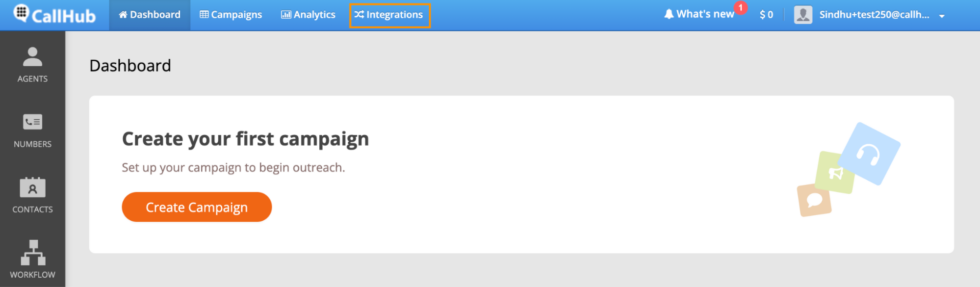
Find Action Network in the integrations list.
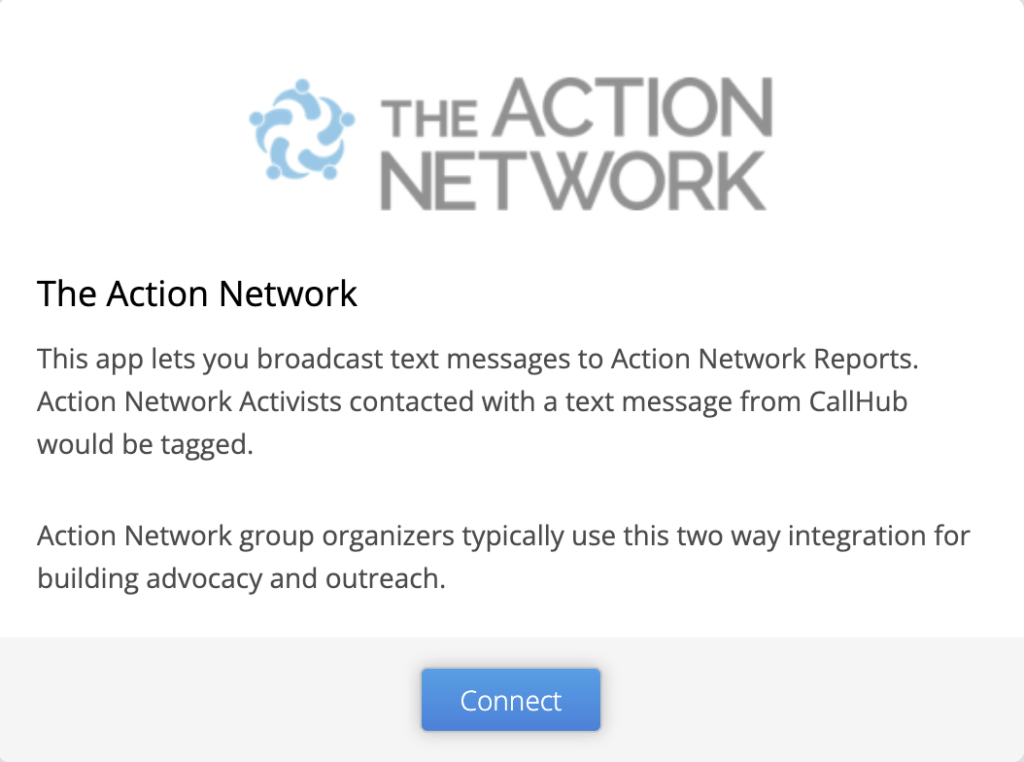
Step 2: Connect Action Network
Click Connect to start the integration.
You will be asked for:
- Action Network API keyAccess “Settings”
- Group name
You can find your Action Network API key by logging in to Action Network and going to:
Start Organizing → Details → API & Sync
Choose the correct group and copy the API key from there.
Action Network’s API documentation is also useful if your team needs to confirm how data access works.
Step 3: Add the API key and group name
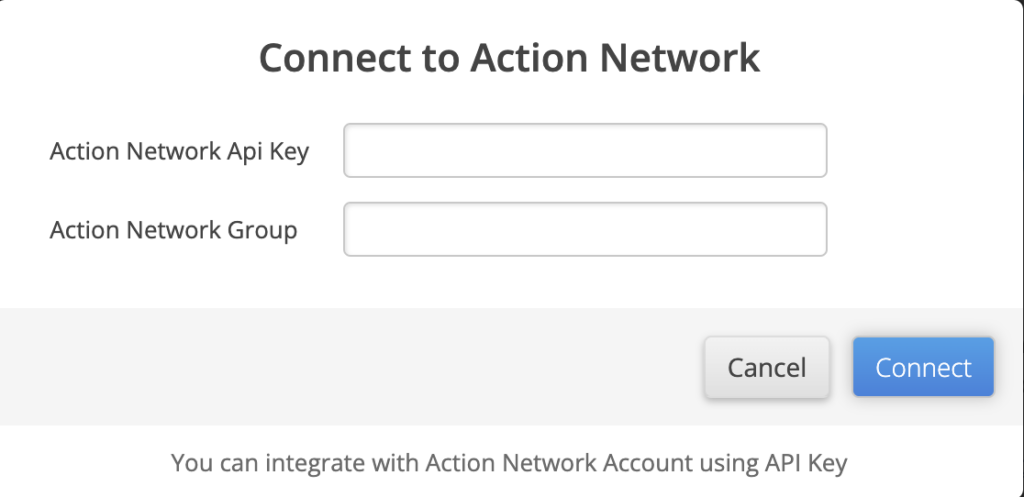
Enter the API key and group name into CallHub.
Then click Connect.
Note: You can import one Action Network group per CallHub account. Choose the group carefully if your organization manages multiple programs.
Step 4: Configure contact fields
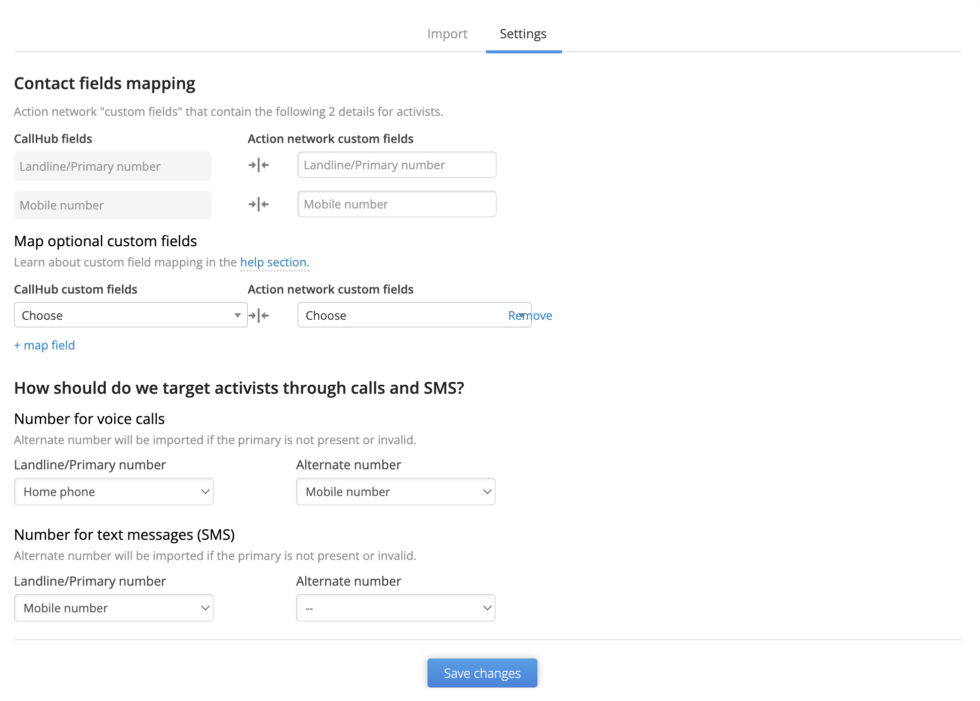
Go to Settings and configure custom fields for activists as needed.
This step decides which supporter details will appear in CallHub when volunteers are calling.
Useful fields may include:
- First name
- Last name
- Phone number
- City
- State
- ZIP code
- Tags
- Event RSVP status
- Donation history
- Volunteer interest
- Issue interest
- Custom campaign fields
Only show fields that help volunteers have better conversations. Too many fields can slow callers down.
Step 5: Import Action Network reports
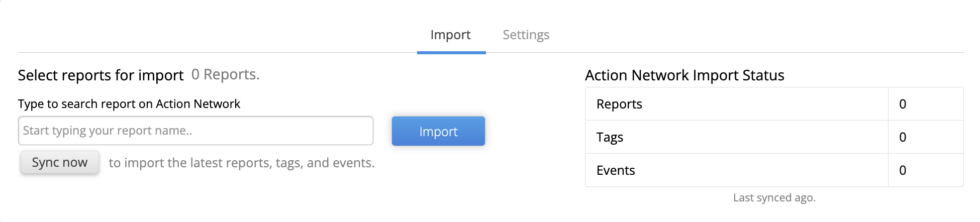
Click Import to fetch reports from Action Network.
Choose the report you want to import into CallHub and click Import Selected.
The import may take a few minutes. You should receive an email notification once it is complete.
Step 6: Sync new or updated reports
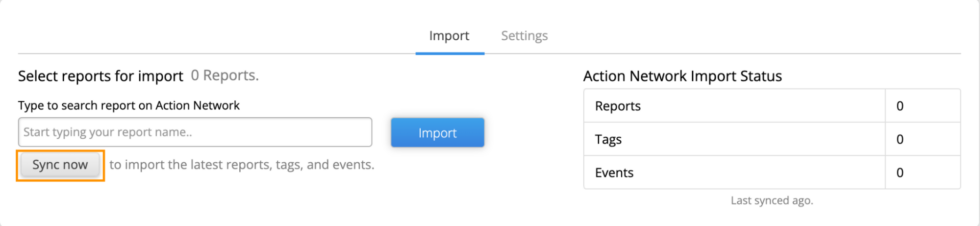
If you add more reports to your synced Action Network group, go back to the Import section in CallHub.
Search for the new report and click Sync Now.
Before launching a live phone bank, test the report import with a small list so you can confirm that names, phone numbers, tags, and fields are coming through correctly.
How to create a report in Action Network for phone banking
An Action Network report is a curated list of activists based on filters such as tags, forms, events, geography, email engagement, or campaign actions.
Reports are the bridge between your Action Network CRM and your CallHub phone bank.
You can use reports to create focused phone banking lists instead of calling everyone in your database.
Useful Action Network report filters
| Filter | How to use it for phone banking |
| Petition or form | Call people who signed a specific petition or completed a form |
| Event RSVP | Call registrants with reminders or no-show follow-up |
| Email interaction | Call supporters who clicked an email but did not take action |
| Geographic location | Call supporters in a specific district, city, ZIP code, or region |
| Membership status | Prioritize active members, lapsed members, or new members |
| Action history | Call people who donated, volunteered, attended, or signed before |
| Custom fields | Segment by campaign issue, role, language, or supporter type |
| Tags | Build lists around campaign interest, supporter level, or follow-up need |
| Existing report | Create nested segments for more precise outreach |
Before importing the report into CallHub, check three things:
- Does every contact have a valid phone number?
- Does the list exclude people who should not be called?
- Does the report include the fields volunteers need during the call?
A good report saves volunteer time before the first call starts.
How to phone bank with Action Network and CallHubHow to phone bank with Action Network and CallHub
Once the integration is active and your report is imported, you can create your CallHub phone banking campaign.
1. Confirm contact list mapping
Your Action Network report becomes a contact list in CallHub.
Before launching, review a small sample of contacts.
Check:
- Names are correct.
- Phone numbers are present.
- Tags imported correctly.
- Custom fields are visible.
- Suppression or do-not-call tags are handled.
- Contacts are in the right campaign segment.
This is the stage where you catch list problems before volunteers start calling.
2. Use tags to guide follow-up
Tags are one of the most important parts of the integration.
Tags applied during a CallHub phone banking campaign can help keep Action Network updated with what happened during outreach.
Common phone banking tags include:
- Event RSVP yes
- Event RSVP maybe
- Wants volunteer link
- Wants donation link
- Needs follow-up
- Needs more information
- Wrong number
- Do not call
- Strong supporter
- Undecided
- No answer
Tags should not be vague. A tag should tell the next team what to do.
Weak tag:
- Interested
Better tag:
- Wants volunteer link
- Needs event details
- Callback requested
Clear tags make follow-up easier.
3. Choose the right dialer
CallHub offers different dialing options. Choose the dialer based on your campaign goal, list quality, compliance needs, and volunteer experience.
| Dialer | Best for | Use carefully when |
| Power Dialer | Event reminders, volunteer recruitment, fundraising, advocacy calls where volunteers need control | You need very high volume |
| Auto Dialer | Time-sensitive outreach where unanswered calls should be skipped faster | Conversations need detailed notes |
| Predictive Dialer | High-volume phone banking with trained agents and clear scripts | Calling mobile-heavy lists or complex persuasion campaigns |
| Manual Dialing | Compliance-sensitive outreach or high-context calls | Speed is the main campaign goal |
For advocacy and nonprofit outreach, do not choose the fastest dialer by default. Choose the dialer that gives volunteers enough time to record the outcome correctly.
4. Add your call script
A call script gives volunteers structure.
Your script should include:
- Who is calling
- Why the person is being contacted
- Main ask
- Response paths
- Tags or outcomes to apply
- Follow-up instructions
- Closing line
Example event phone banking script:
“Hi, is this [Name]? My name is [Volunteer Name], and I’m calling with [Organization]. You recently signed up for [Event Name], and we’re calling to confirm whether you can still attend on [Date].”
If yes:
“Great. I’ll mark you as confirmed and send the event details by text.”
If maybe:
“No problem. Would it help if we sent the details so you can decide later?”
If no:
“Thanks for letting us know. We’ll update our list.”
If they ask not to be called:
“Understood. I’ll mark that now.”
5. Record RSVP information
When calling for an event, volunteers can collect RSVP information in CallHub and sync the response back to Action Network.
Track:
- RSVP yes
- RSVP maybe
- RSVP no
- Needs event details
- Needs transportation
- Wants reminder
- Wrong number
- Do not call
This helps the event team plan attendance and follow up with the right people.
6. Create follow-up actions
Call outcomes should trigger follow-up.
For example:
| Call outcome | Follow-up |
| RSVP yes | Send event details |
| RSVP maybe | Send reminder and details |
| Wants to volunteer | Send volunteer signup link |
| Wants donation link | Send donation page |
| Needs more information | Send issue explainer |
| No answer | Send text follow-up if allowed |
| Do not call | Suppress future calls |
CallHub’s workflow automation can help route contacts based on tags or call completion status.
7. Recruit volunteers for phone banking
The current article already covers volunteer recruitment through CallHub forms. Keep this section, but connect it more directly to the Action Network workflow.
If your organization recruits volunteers through a CallHub embeddable form, those volunteers can be added to your CallHub database. Once they activate their accounts, you can assign them to calling or texting campaigns.
For organizations using Action Network for volunteer forms, create a report of people who signed up to help. Then import that report into CallHub for follow-up calls or texts.
Volunteer recruitment call example:
“Hi [Name], this is [Volunteer Name] with [Organization]. You recently said you were interested in helping with [Campaign]. We’re running phone banking shifts this week. Could you join a two-hour shift on [Day]?”
What to record:
- Wants phone banking shift
- Wants texting shift
- Needs training link
- Not available this week
- Wants future updates
- Do not contact
For broader setup, use CallHub’s political phone banking guide or the phone banking software page.
Text banking with Action Network and CallHub
Phone banking is not the only outreach channel you can run from Action Network lists.
CallHub’s peer-to-peer texting can help organizations follow up with activists, event registrants, donors, volunteers, and campaign supporters.
Use texting for:
- Event reminders
- Donation links
- Volunteer shift links
- Petition follow-up
- No-answer call follow-up
- Polling place or action information
- RSVP confirmation
- Quick supporter replies
Peer-to-peer texting setup
To create a peer-to-peer texting campaign after connecting Action Network:
- Choose Peer-to-Peer Texting from your CallHub dashboard.
- Name the campaign clearly.
- Select the Action Network report or imported supporter list.
- Add the text script.
- Use merge tags to personalize the message.
- Select the sending number.
- Assign volunteers.
- Add campaign instructions.
- Set start and end dates.
- Set daily messaging hours.
- Review opt-out handling.
- Launch the campaign.
Sample text:
“Hi [Name], this is [Volunteer] with [Organization]. Thanks for signing [Petition Name]. We’re calling on supporters to join [Event or Action] on [Date]. Can we send you the details?”
If the supporter replies yes, send the link.
If they reply stop or ask not to be contacted, follow your opt-out process immediately.
When to use calls vs. texts
| Outreach need | Better channel |
| Complex conversation | Phone call |
| Event reminder | Text |
| Donation ask to warm supporter | Call plus text link |
| Volunteer recruitment | Call or text, depending on urgency |
| No-answer follow-up | Text |
| Issue persuasion | Call |
| Link delivery | Text |
| RSVP confirmation | Text or call |
Calls create conversation. Texts create quick follow-up. Use both when the campaign journey needs both.
What data syncs between Action Network and CallHub?
Data sync is the reason the integration matters.
Without sync, your team may call supporters in CallHub but still need to manually update Action Network later. That creates cleanup work and increases the chance of missed follow-up.
With the integration, CallHub can import Action Network reports, contacts, tags, events, and custom fields based on your setup. Call outcomes and tags from CallHub can then help update the supporter’s campaign record.
Common sync use cases include:
| CallHub action | Why it matters in Action Network |
| Tag applied | Updates supporter segment for future email, call, or text outreach |
| RSVP recorded | Helps event team track attendance |
| Volunteer interest marked | Moves supporter into recruitment follow-up |
| Donation interest marked | Moves supporter into fundraising follow-up |
| Wrong number marked | Helps clean supporter data |
| Do-not-call marked | Helps suppress unwanted future calls |
| Text reply recorded | Gives future outreach context |
| Follow-up needed | Helps staff or volunteers prioritize next action |
Before running a large campaign, test the sync with a small list.
Create a test report, import it into CallHub, make a test call, apply a tag, record an outcome, and confirm how that appears back in Action Network.
Troubleshooting common Action Network and CallHub issues
Most integration problems come from API access, group selection, report setup, field mapping, or sync expectations.
Use this table before launching a full campaign.
| Problem | Likely cause | What to check |
| Action Network connection fails | API key issue | Confirm the API key from Action Network’s API & Sync area |
| Report does not appear in CallHub | Wrong group or report access | Check the connected group and make sure the report is in that group |
| Contacts import without phone numbers | Report does not include phone fields | Edit the report or contact records before import |
| Tags are missing | Tags were not synced or mapped | Check integration settings and tag availability |
| Custom fields are missing | Fields not configured in CallHub settings | Add or map the custom fields before import |
| Volunteers see too much information | Too many fields shown during calls | Limit visible fields to what the script needs |
| Call outcomes do not update Action Network | Sync or tag setup issue | Test with one contact and verify tag or outcome mapping |
| Text follow-up is not available | Campaign type or texting setup missing | Confirm texting campaign settings and approved templates |
| Duplicate contacts appear | Same supporter appears in multiple reports | Deduplicate lists or define one campaign source list |
Do not wait until the end of a live phone bank to test sync. Run a small test first.
Compliance basics for Action Network phone banking and texting
This section is not legal advice. Confirm the rules for your organization, jurisdiction, phone numbers, and outreach method before launch.
Phone banking and texting rules can vary depending on whether outreach is political, nonprofit, advocacy, union, or fundraising-related. Rules may also differ based on whether calls are live, prerecorded, manually dialed, autodialed, or text-based.
Start with the FCC’s rules for political campaign calls and texts and FCC guidance on robocalls and texts.
For text messaging, also review CTIA’s Messaging Principles and Best Practices.
Before launch, confirm:
- Are you calling landlines, mobile numbers, or both?
- Are calls manual, autodialed, or prerecorded?
- Are texts peer-to-peer or broadcast?
- Does your list include the right consent for the method?
- Are opt-outs honored?
- Are internal do-not-call requests suppressed?
- Are calls and texts sent within permitted hours?
- Does your state add stricter requirements?
- Are volunteers trained on what to do when someone asks not to be contacted?
- Are tags used to suppress future outreach where needed?
Every call and text script should include a clear opt-out or do-not-contact process.
When should you use Action Network and CallHub together?
Use Action Network and CallHub together when your supporter data is already in Action Network and your team needs to run high-touch outreach.
This setup is useful for:
- Advocacy campaigns
- Petition follow-up
- Event turnout
- Volunteer recruitment
- Fundraising calls
- Member outreach
- GOTV calls
- Ballot measure campaigns
- Issue education
- Rapid response campaigns
- Distributed phone banking
- Peer-to-peer texting
Use Action Network alone when the campaign is mostly email-based or does not require live calls, dialer controls, volunteer assignment, or texting follow-up.
Use CallHub with Action Network when your team needs to move from digital engagement to direct conversation.
Why CallHub works as the outreach layer for Action Network
Action Network helps you collect and organize supporters. CallHub helps you reach them by phone and text.
That combination is useful because outreach does not stop at list building.
After someone signs a petition, RSVPs for an event, clicks an email, or donates, the next action often needs a more direct touch. A call can confirm interest. A text can send the link. A tag can update the supporter record for future outreach.
CallHub helps Action Network users run that next step with:
- Phone banking campaigns
- Peer-to-peer texting
- Dialer options
- Scripts
- Survey questions
- Call dispositions
- Tag-based follow-up
- Volunteer assignment
- Reporting
- Workflow automation
For setup details, visit CallHub’s Action Network integration. For a complete overview of how phone banking works, read the complete guide to political phone banking.
Conclusion
Action Network helps you organize supporters. CallHub helps you reach them with live calls, texts, scripts, tags, and follow-up workflows.
Start by creating a clean Action Network report. Connect the right group to CallHub. Import the report. Choose the dialer based on the campaign goal. Add a clear script. Train volunteers on tags and outcomes. Test the sync before launch.
That setup gives your team a cleaner way to move supporters from digital engagement to real action.
To get started, explore CallHub’s Action Network integration and phone banking software.
FAQs on Action Network phone banking
What is Action Network?
Action Network is a CRM and digital organizing platform used by campaigns, unions, nonprofits, and advocacy groups to manage activists, petitions, forms, events, donations, tags, and email lists.
Can Action Network be used for phone banking?
Action Network can help you build and segment supporter lists, but many teams connect it to a dedicated phone banking platform like CallHub when they need dialers, scripts, call outcomes, text follow-up, and volunteer assignment.
What is Action Network CRM?
Action Network CRM refers to the supporter database and organizing tools inside Action Network. It stores activist records, tags, forms, events, donation information, and engagement history that teams can use for outreach.
How does CallHub integrate with Action Network?
CallHub connects to Action Network through an API key and group name. Once connected, you can import Action Network reports into CallHub, run calling or texting campaigns, apply tags, and sync relevant outcomes back to Action Network.
Where do I find my Action Network API key?
In Action Network, go to Start Organizing → Details → API & Sync. Choose the correct group and copy the API key. Your account needs the right permissions to access the key.
What is an Action Network report?
An Action Network report is a saved list of activists based on filters such as tags, forms, events, geography, email engagement, donations, or custom fields. Reports can be imported into CallHub as contact lists.
What data syncs between Action Network and CallHub?
Depending on setup, CallHub can import contacts, reports, tags, events, and custom fields. Tags, call outcomes, RSVP details, notes, and follow-up indicators can help update Action Network records.
Can I use CallHub for Action Network text banking?
Yes. You can import Action Network reports into CallHub and run peer-to-peer texting campaigns for event reminders, donation links, volunteer recruitment, petition follow-up, and no-answer call follow-up.
What should I test before launching a phone bank?
Test the API connection, group selection, report import, field mapping, tags, one sample call, one sample text, and one sync back to Action Network. A small test helps prevent large cleanup problems.
Is Action Network phone banking compliant?
Compliance depends on your outreach type, phone numbers, technology, consent, jurisdiction, and message content. Review FCC, CTIA, carrier, and state rules before launching calls or texts.