



Table of Contents
The majority of text messages are read within the first three minutes. Not only that, but text message engagement rates are 8 times higher than email engagement rates. That means running an SMS poll is the best way to get immediate feedback from your audience.
Political campaigns know this well. In 2016, Bernie Sanders’ campaign sent over 10 million texts, not just for polling, but to get supporters to take action. By 2020, that number soared to 88 million texts. SMS polling has evolved, and there are now multiple ways to conduct a text message poll.
SMS polling has continued to evolve, and there are multiple ways to conduct polls through text. Read on:
Who uses SMS polling?
Political polls
Political campaigns often use SMS polls or text message polls to gauge support for a candidate or issue. For example, during Beto O’Rourke’s Senate run, his team used a text message poll to identify supporters and non-supporters. This allowed them to send targeted messages and drive get-out-the-vote (GOTV) efforts.
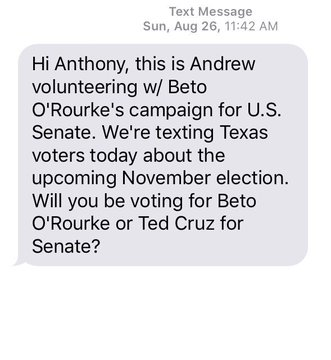
Using this poll, his campaign was able to ID the people in his contact list into supporters and non-supporters.
By identifying supporters, campaigns are able to send more targeted messaging, eventually leading to GOTV campaigns to get dedicated supporters to vote.
Contest voting
SMS polls are the go-to polling method for TV shows and competitions. Here, shows ask viewers to text a specific keyword to a number (shortcode) in order to vote for a contestant.
Here’s an example from American Idol:
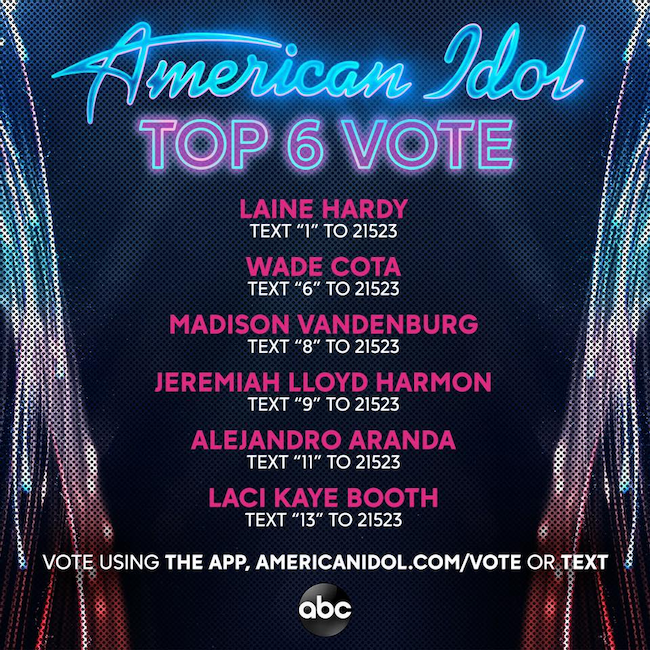
It’s as simple as sending a quick text to a number using their phones right when they see the prompt on their TV screen. A testament to that, over 600 million viewers participated in voting by text by the show’s 11th season.
Implementing a text message poll system, even for smaller-scale competitions like school talent shows, is easy with SMS opt-in campaigns.
Radio show polls
Radio shows can use an SMS poll or poll in text message to engage listeners.
A Radio Jockey can announce an SMS poll on air and get the results of the poll to announce as they come in.
Research polls
SMS polling, or running a text message poll, is the most efficient way for researchers to gather valuable data.
The Detroit Regional Chamber used text messages to gain insight into the struggles of the average Michigan family during the COVID-19 crisis.
50% of the respondents were polled via text messages.
Not all SMS polls are the same, here are the different options you have when running an SMS poll.
Outbound SMS polls
For outbound SMS polls, you need a list of contacts who have already given their permission for you to text them.
Using Mass texts for polling
If you have a list of contacts that you want to poll with a one-off question, outbound mass texts are the best option. You can set up an SMS poll using a mass texting software. Here’s how you can do that with CallHub.
- Create your initial questions: The first message should include the poll question and the keyword for responses. Personalize it with merge tags, like the recipient’s name.
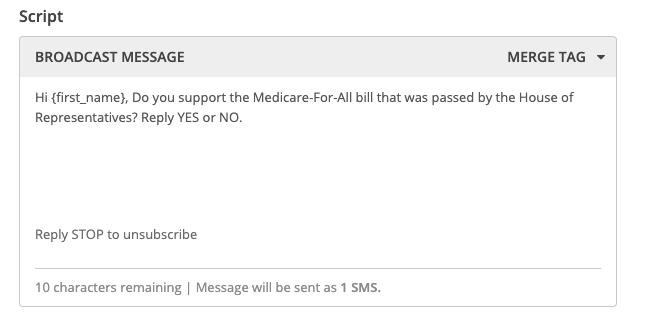
- Add automatic follow-ups: Set up automatic replies based on the keyword received.
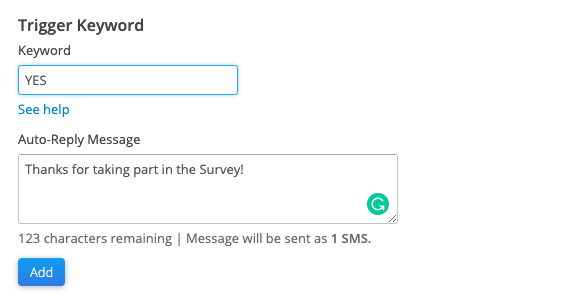
- Sync the survey results: If you have synced your CallHub account with a CRM like Nationbuilder, Salesforce and many more with CallHub you will be able to add tags to your contacts based on the keyword they reply with.
The other option is to export your campaign data as a spreadsheet and filter based on your required keyword.
Read also: 11 Top Features of a Political Texting Tool (+ Election Campaign SMS Message Templates)
Using Peer-To-Peer texts for polling
Peer-to-peer texts allow for back and forth conversations between respondents and texting agents. This allows for more in-depth survey questions. The disadvantage is the chance of respondents dropping off between questions.
Here’s how you can use peer-to-peer texts for an SMS poll or text message poll
- Create your initial message: Similar to a phone survey, you add a script to your peer-to-peer texting campaign. This will include the initial message agents send out along with survey questions. You can even get a higher response rate by personalizing your messages with merge tags.

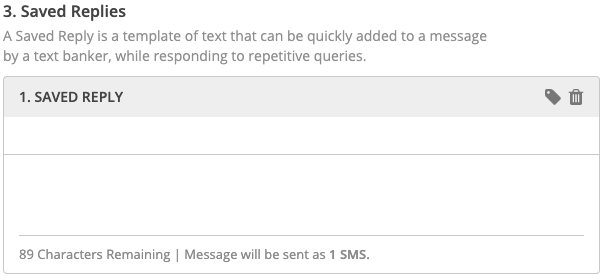
- Provide reply templates for agents: To allow your agents to quickly respond to incoming messages, you can provide templated replies that they can send out:
- Export the survey results: Like with a mass texting campaign, syncing CallHub with your CRM allows for easy export and analysis of your survey data. For peer-to-peer texting campaigns, agents can add tags to volunteers based on their survey responses.
Inbound SMS polls
If you don’t have a contact list that you have permission to send text messages, set up an SMS opt-in Campaign and get people to text to your number.
Using SMS opt-ins with keywords
With SMS opt-in campaigns, your audience can participate in an SMS poll by texting a keyword to your campaign number. Here’s how you can set up a campaign with CallHub.
- Rent a number: In order to be able to run an SMS opt-in poll, you need to get a shortcode (5-6 digits) or long code (10 digits) for people to text.
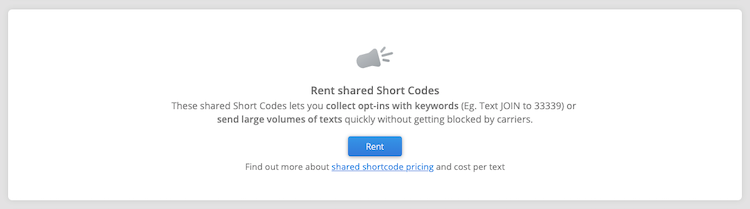
- Rent Multiple Keywords: Assign unique keywords for each poll option.
- Set up Opt-in campaigns for each keyword: Based on the keyword, contacts are added to separate lists, making it easy to tally results.
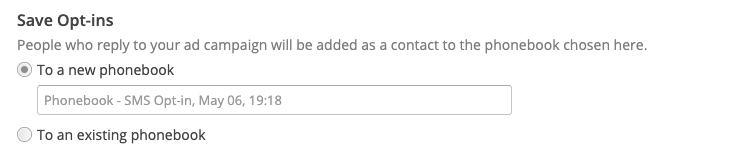
Try out an SMS poll for free with CallHub. You can get started by signing up here.
How to run an SMS poll with best practices
Step 1 – Define Your Objectives: Decide what you want to learn from your SMS poll. Are you measuring support, gathering feedback, or running a contest? Having a clear goal shapes every decision that follows.
Step 2 – Build a compliant contact list: Collect opt-ins through online forms, events, or SMS keywords. Never purchase lists. Ensure every recipient has given explicit permission to receive texts from you.
Step 3 – Craft your poll question: Keep it short and clear. Use simple language and direct instructions. For example:
“Who will you vote for? Reply 1 for Candidate A, 2 for Candidate B.”
Step 4 – Choose your SMS platform: Pick a platform that supports SMS polls, automated replies, and data export. Verify that it complies with local regulations before committing.
Step 5 – Personalize and send: Use merge tags to personalize your messages. Time your send for when recipients are most likely to be active and responsive.
Step 6 – Automate follow-ups: Set up automatic replies triggered by responses — thank supporters, confirm their vote was recorded, or ask a follow-up question to dig deeper.
Step 7 – Analyze results: Export responses to a spreadsheet or CRM. Use tags and filters to segment your audience, identify patterns, and draw meaningful conclusions from the data.
Compliance best practices to follow
- Always get explicit consent before texting.
- Include opt-out instructions (e.g., “Reply STOP to unsubscribe”).
- Send messages only during legal hours (typically 8 a.m. to 9 p.m. local time).
- Protect recipient data and follow privacy laws (TCPA in the US, GDPR in Europe, CASL in Canada, AEC in Australia).
- Keep your poll short—1 to 3 questions is best.
- Use incentives if appropriate, like gift cards or exclusive content, to boost response rates.
The bottom line,
SMS polls are one of the fastest, most effective ways to gather real-time feedback, measure support, and keep your audience engaged. With open and response rates that consistently outperform email and other channels, they’re a tool no modern campaign or organization should overlook.
The formula is simple: get consent, keep your questions short, automate smartly, and let the data guide your next move.
Ready to launch your first SMS poll? CallHub makes it easy to set up compliant, high-converting SMS polls with powerful automation, real-time analytics, and expert support to back you up every step of the way.
👉 Talk to a CallHub Expert Today and see how SMS polling can transform the way you connect with your audience.
FAQs: SMS poll
1. What is an SMS poll, and how does it work?
An SMS poll is a survey sent by text message. Recipients reply with a keyword or number to answer. Campaigns send a question to their contact list, and responses are automatically collected and counted. This gives real-time feedback on voter opinions.
2. Are SMS polls legal for political campaigns in the US, Canada, Australia, and Europe?
Yes, but you must follow local laws. Always get consent before texting, provide opt-out options, and follow privacy rules. In the US, follow TCPA; in Canada, CASL; in Europe, GDPR; and in Australia, AEC rules. Check with legal experts for your region.
3. How do I build a compliant contact list for SMS polling?
Collect opt-ins through online forms, events, or SMS keywords. Never buy lists. Make sure everyone on your list has given clear permission to receive campaign texts.
4. Can SMS polls help with Get Out The Vote (GOTV) efforts?
Yes. Use SMS polls to find supporters, confirm voting plans, and send reminders to those likely to vote for your campaign.
5. Can I create a poll in a text message?
Yes. While SMS doesn’t have built-in poll buttons, you can easily run a poll by asking recipients to reply with a keyword or number.