

Table of Contents
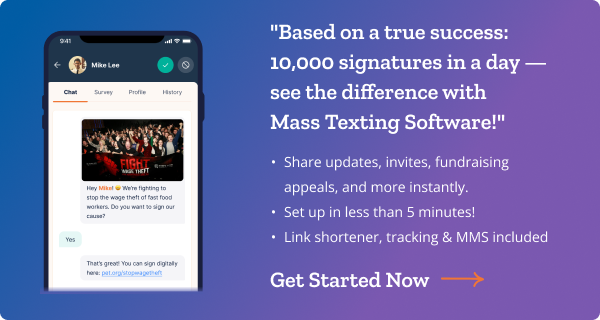
Sheila Cherfilus-McCormick’s 2021 congressional campaign in Florida made history—winning by just five votes. Her campaign manager credits that victory to one thing: smart use of bulk MMS software. Through strategic segmentation, precise targeting, and the visual power of MMS messaging, Sheila’s team cut through the noise and mobilized voters at the right moment.
If a five-vote margin is possible with bulk MMS, imagine what it can do for your nonprofit fundraising drive, your GOTV effort, or your next advocacy mobilization push.
This guide will show you exactly why bulk MMS messaging is the most powerful text outreach tool available today—and how to use it on CallHub.
What is bulk MMS messaging?
Bulk MMS (Multimedia Messaging Service) messaging refers to sending out messages with
- Audio,
- Graphics,
- PDFs,
- Video,
- or other Rich media elements in them.
MMS should be your go-to tool for sharing media with text messages, given their deliverability and open rates.
Why use bulk MMS for texting?
According to CallHub’s sales team, one of the most frequently asked questions is – Why should we use MMS texting? There are two reasons for this question:
- On average, Bulk MMS messaging can cost a marketer 2-3 times more than a simple text message.
- You need more preparation to design or collate the media you want to send. Text messages just need a well-thought-out text.
However, time and again, to our sales team’s delight, we’ve found that despite these challenges, 86% of enterprises and campaigns use or plan to use our bulk MMS software.
Is it counterintuitive? It does seem so, but the rationale is simple: the benefits of MMS outweigh its associated challenges. We list some of the benefits below(2026 stats):
- MMS drives up to 8x more clicks than plain SMS
- It has a 20% higher opt-in rate than SMS
- MMS messages are 3x more likely to be shared
- These MMS campaigns can achieve conversion rates as high as 15%
- MMS supports up to 1,500 characters vs. 160 for SMS
- Bulk MMS messages are easy to set up.
On CallHub’s bulk MMS software, you can set up a text campaign you usually do and add media elements to convert it into an MMS text. We will explain this process in detail later on in the article.
SMS vs. MMS: What’s the difference?
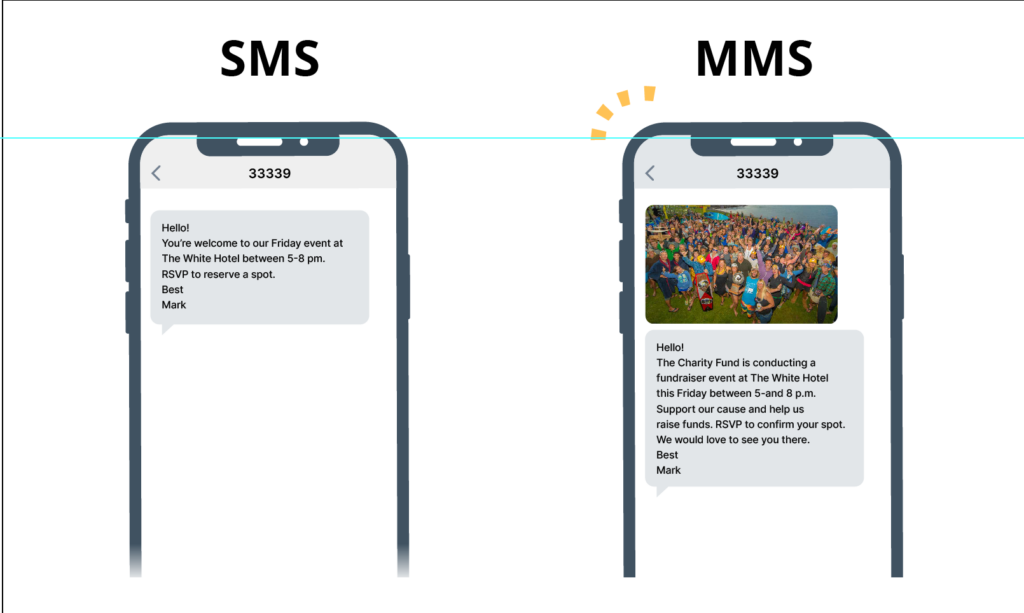
Before we learn more about bulk MMS software, let’s take a moment to understand the difference between MMS and SMS messages.
| SMS | MMS | |
| Character limit | Upto 160 GSM/ASCII characters or 70 Unicode characters | Upto 1600 characters |
| Delivery time | Shorter delivery time | Longer delivery time compared to SMS |
| Pricing | Bulk MMS software supports audio (MP3), video (MP4), images, posters, GIFs, and other rich media. | On average, 2-3x costlier than SMS. However, VoIP or shortcode-based messages are cost-effective. |
| Content type | Text-only | Bulk MMS software supports audio MP3s, video MP4s, images, posters, GIFs, and other rich media elements. |
| Content limitations | Need to be precise and to the point. | Can express your message freely without worrying about character limitations. However, the file size you can upload is limited to 1 MB. |
| Delivery | SMS supports delivery to almost all mobile phones. | Multimedia messaging is only enabled for those smartphones that support them. Messages might miss some audiences that do not have smartphones. |
Why nonprofits use bulk MMS messaging for fundraising
For nonprofit digital marketers, nonprofit text messaging software with MMS capabilities is a game-changer. Plain donation appeals blend into inboxes. A compelling image of the people your mission serves—or a short video from a program beneficiary—stops scrolling and drives action.
How nonprofits use bulk MMS on CallHub:
- Video donation appeals: Share a 30-second clip that makes your case better than any copy ever could.
- Beneficiary impact images: Show donors exactly where their money goes with a single powerful visual.
- Event posters & RSVP links: Replace costly postcards with MMS event invites. Link directly to your RSVP page.
- Volunteer recruitment: Send a branded flyer and a sign-up link to your contact list in minutes.
- Fundraising deadline reminders: Pair an urgent message with a matching gift graphic to drive last-minute donations.
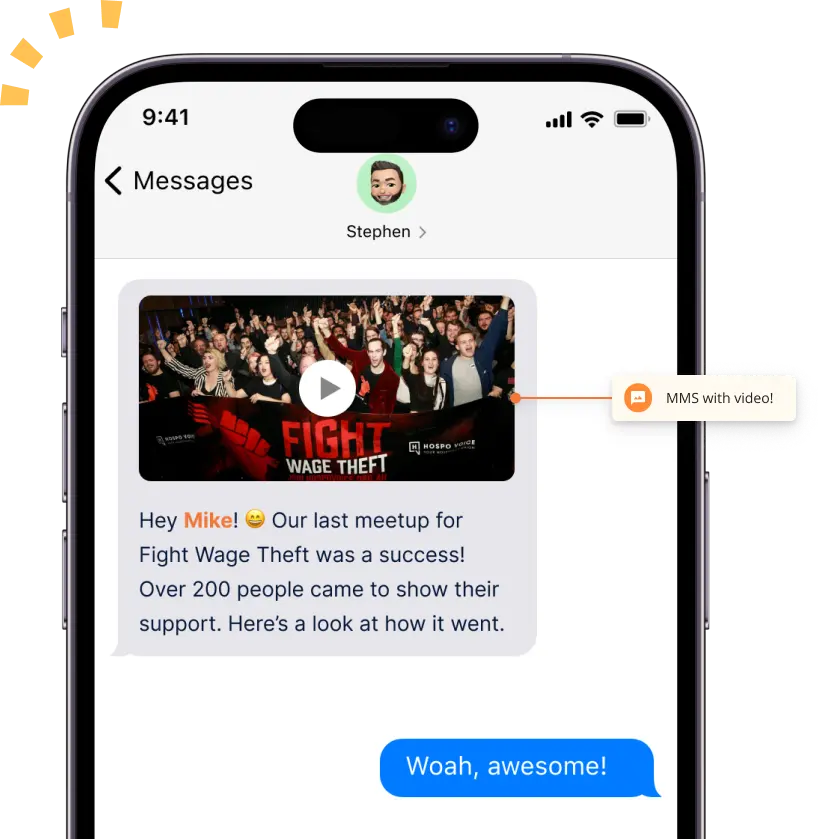
The possibilities for using bulk MMS messaging are endless. With a hint of imagination, you can use your bulk mms software to promote candidates for elections, launch new products, and more.
Pro tip for nonprofits: Use merge tags in CallHub to personalize MMS messages with the donor’s first name and giving history. Personalized outreach consistently drives higher response rates.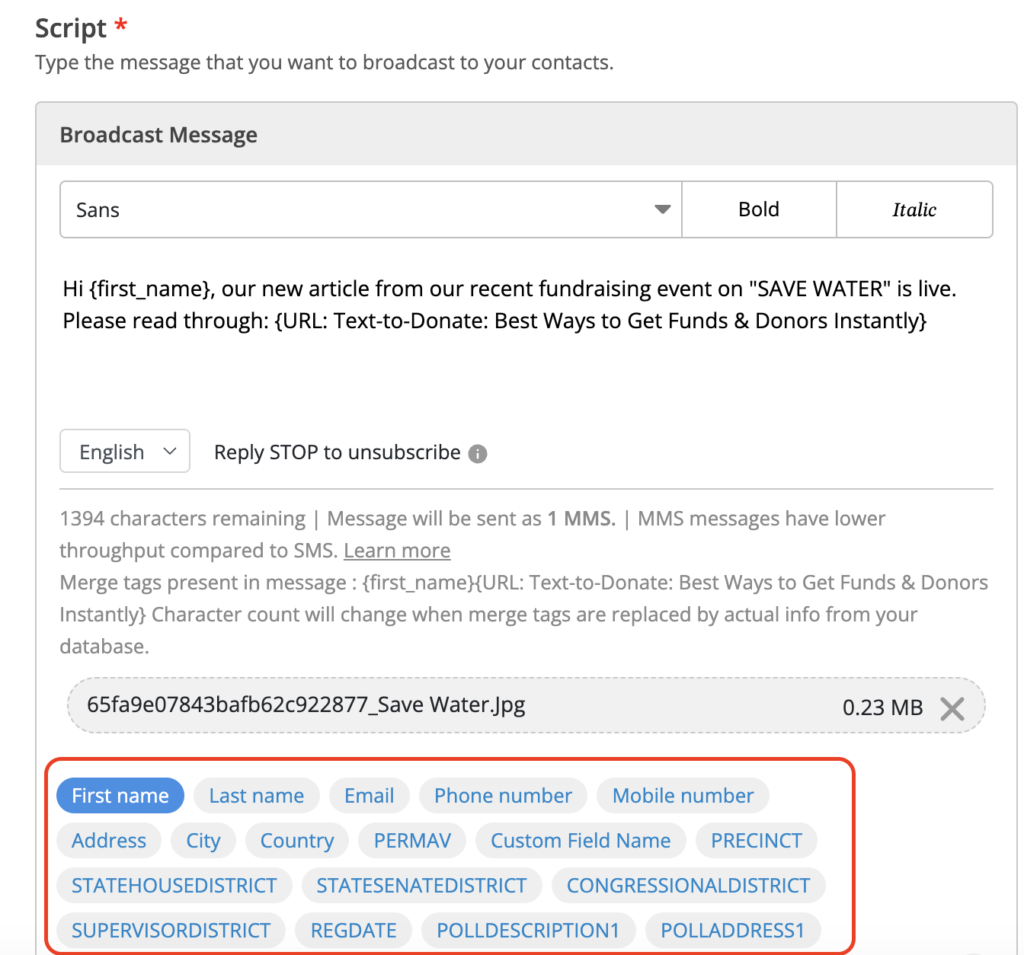 |
How political campaigns win votes with bulk MMS
Political campaign texting software with MMS capabilities is now a standard tool for serious campaigns. The Sheila Cherfilus-McCormick case study is proof that we spoke about at the beginning of the article—but it’s not the only one. Campaigns across the country use bulk MMS for political outreach because it puts candidates directly in front of voters with a visual presence that generic robocalls and mailers simply can’t match.
Winning political MMS campaign types:
- Candidate photos & intro messages: Humanize your candidate with a friendly image and a personal note from the candidate themselves.
- Yard sign & poster templates: Send supporters print-ready assets they can download and put to use immediately.
- GOTV reminders: On Election Day, a powerful MMS reminder with polling location info can be the difference.
- Debate watch party invites: Drive attendance with a visually branded event invite.
- Volunteer mobilization: Quickly brief your phone bank teams with a visual script or briefing graphic.
Bulk MMS software for advocacy groups & organizers
Bulk MMS for advocacy groups is one of the most underused tools in the organizer’s toolkit. Advocacy is about making people feel something—urgency, solidarity, hope. Images and video do that better than text alone.
How advocacy organizations use MMS messaging:
- Petition drives: Send a visual call-to-action with a direct link to your petition. Context makes people sign.
- Legislative update graphics: Turn complex policy updates into a shareable infographic.
- Rally & mobilization invites: Send event details, maps, and instructions in a single MMS.
- Supporter news & appeals: Keep your base informed and emotionally connected with regular visual updates.
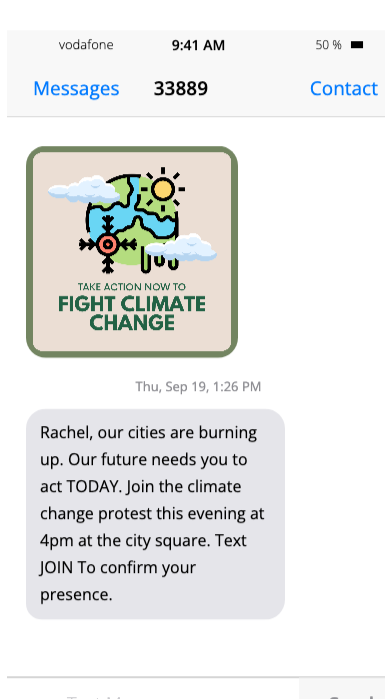
These are just some of the ways you can use MMS messaging.
Ready to get started? Here’s all you need before you get started on your bulk MMS software:
Bulk MMS compliance: 10DLC, TCPA & what you need to know
As your audience operates in environments where a single compliance misstep can derail an entire campaign. Here’s what you need to know before you send a single MMS text campaign.
- 10DLC registration
10DLC (10-digit long code) registration is now mandatory for all A2P (Application-to-Person) messaging in the US. Without it, your messages will be filtered or blocked by carriers. CallHub handles 10DLC registration for you—covering brand approval, campaign setup, and number provisioning—so your outreach stays compliant and deliverable.
- Shortcode
A shortcode number is a short 5-6 digit number. You must have seen brands use numbers like ‘33889’, ‘567891’, etc., to encourage their supporters to text them.
A shortcode number not only guarantees a high deliverability rate and no spam, but it also creates brand awareness. Supporters start associating the 5 or 6-digit number with your campaign.
The registration process for a shortcode number can take anywhere upto 8-12 weeks.
Sometimes, organizations do not want to wait that long, that’s when they opt for shared shortcodes. However, recent policy changes have sunsetted shared shortcodes. You can no longer rent a new shared shortcode.
Read Also: What To Know About Short Code Texting Before Getting Started
- TCPA compliance
The Telephone Consumer Protection Act (TCPA) requires that you obtain express written consent from contacts before sending them automated text messages. Best practices include:
- Using a keyword opt-in campaign to get consent before adding contacts to your MMS list.
- Including a clear opt-out instruction (e.g., “Reply STOP to unsubscribe”) in every message.
- Maintaining a Do Not Contact (DNC) list and honoring opt-outs immediately.
- Never text contacts from purchased lists without verified opt-in consent.
- Political campaign compliance
Political campaigns have additional considerations. GOTV text messages and voter outreach via MMS are permissible under TCPA with proper consent, but rules vary by state. Always consult your campaign’s legal counsel and ensure your contact lists are sourced from compliant voter file vendors.
CallHub compliance certifications include SOC 2 Type II, GDPR, TCPA-compliant workflows, 10DLC-registered numbers, and automated DNC management. Your data and your contacts are protected. |
How to set up a bulk MMS campaign on CallHub
Bulk MMS software is easy once you know the proper steps. Here’s how you can set up your MMS messaging campaign on CallHub.
Begin by creating a text broadcast campaign
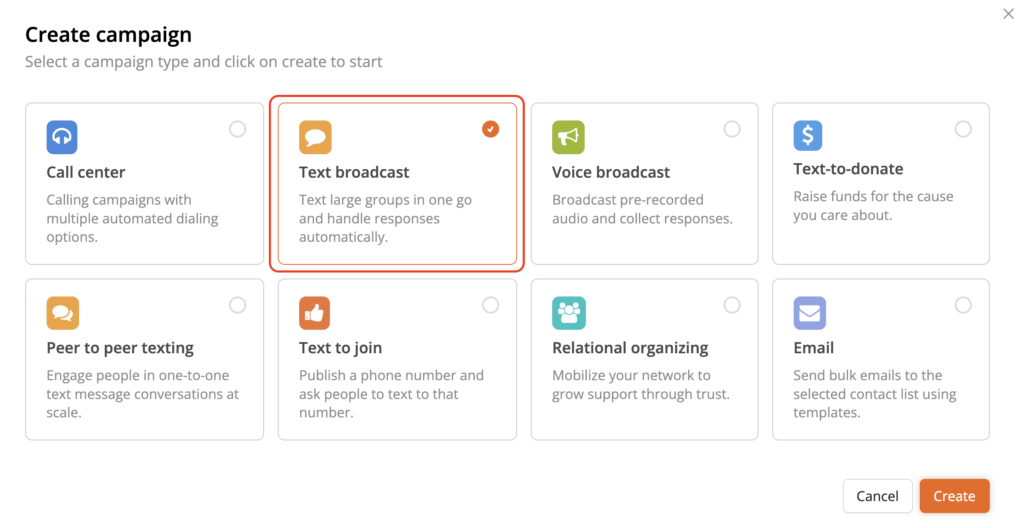
Your MMS campaign will start much like a regular text messaging campaign. Click on ‘Text broadcast’ to begin.
Set up the targeting for your campaign.
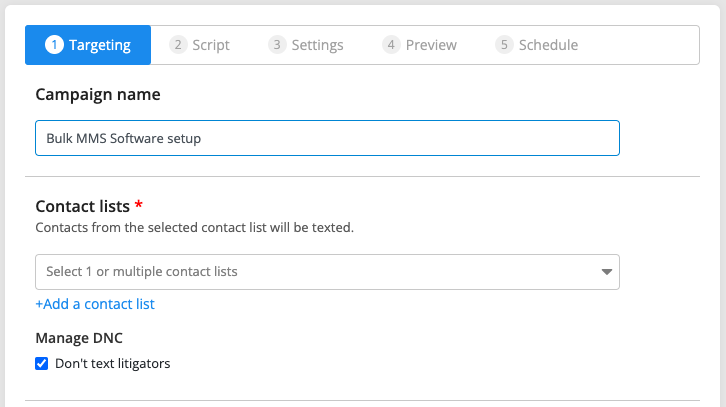
First, name your campaign. Next, select the contact list to whom you want to send your MMS texts. You can choose multiple lists at this stage to send bulk MMS messages.
CallHub also provides the option of managing DNC contacts. You can choose not to text litigators to avoid legal hassles. Our database runs through your contact list to identify litigators and avoid sending them a message.
Once you do that, you can select the number you will send the text message [caller ID].
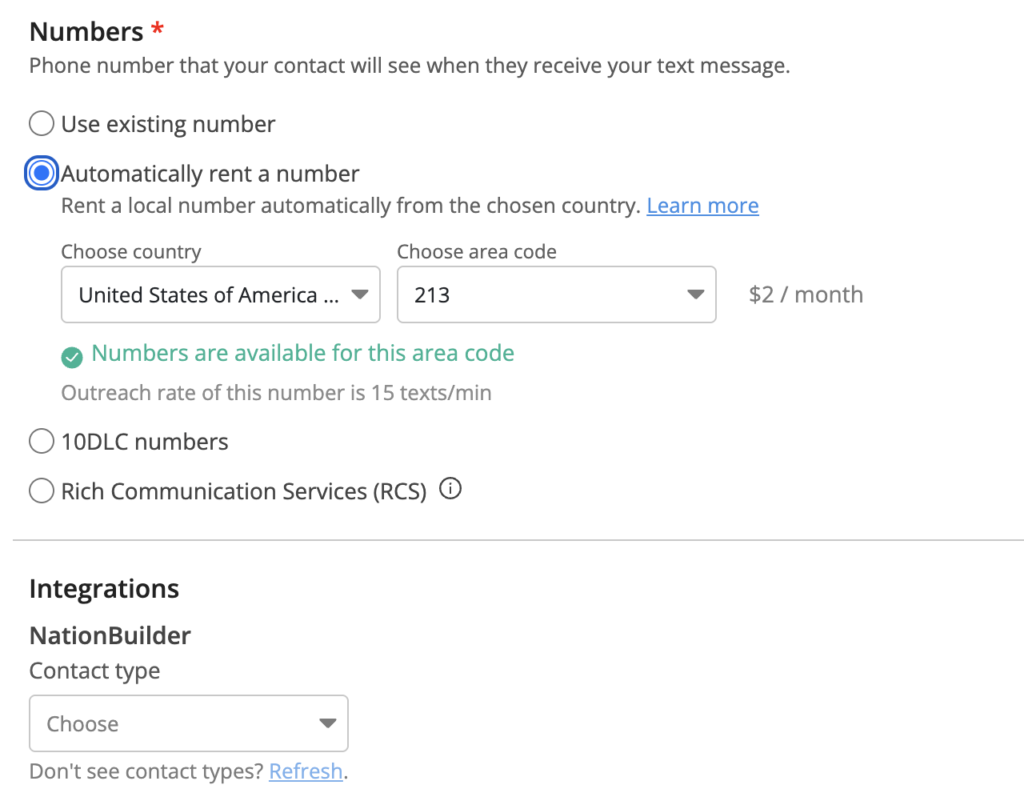
You can choose to rent a number automatically. Renting a number helps protect your privacy and security. You could also opt for a 10DLC or use an existing number.
You can also select the CRM you want to integrate for easy data transfer at this stage.
Create your script and add media elements.
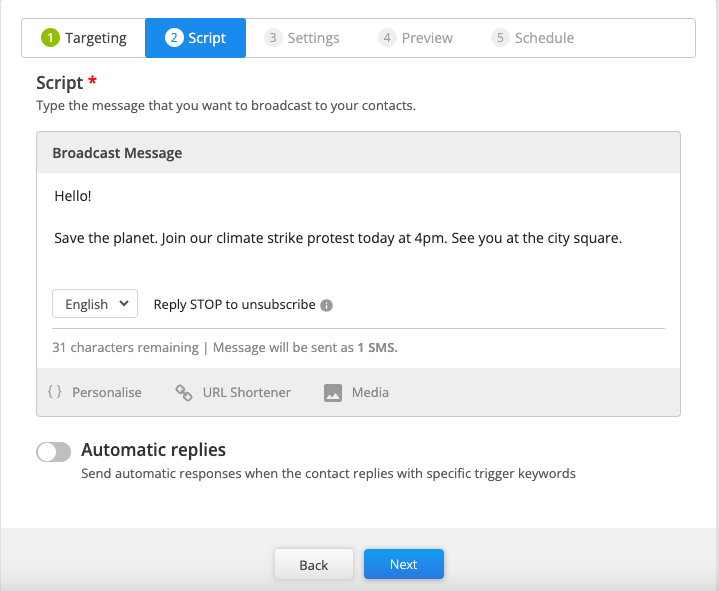
This is the stage where the magic happens. Enter the text script you want to send. CallHub automatically adds an opt-out message to stay compliant with TCPA regulations.
Once you are done, click ‘Media’ to upload your media files.
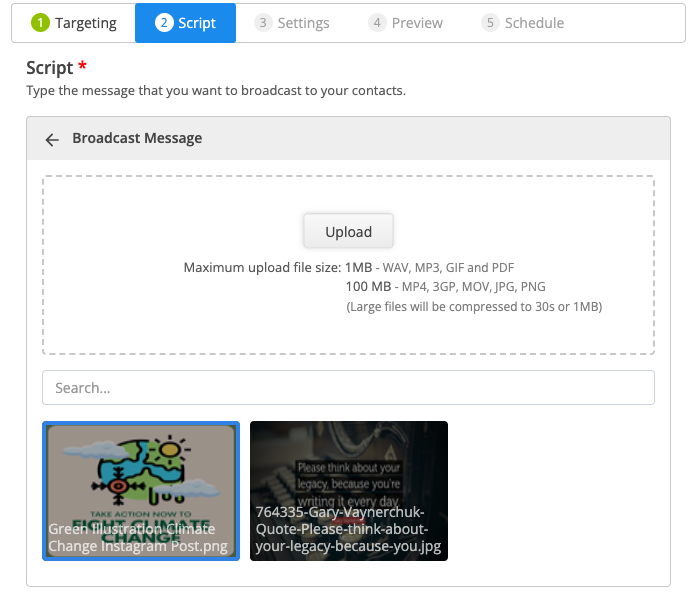
On CallHub, the file size for WAV, MP3, GIF, and PDF files is 1MB max. For MP4, 3GP, MOV, JPG, and PNG files, the size limit is 100MB. Larger files will be compressed for ease of sending.
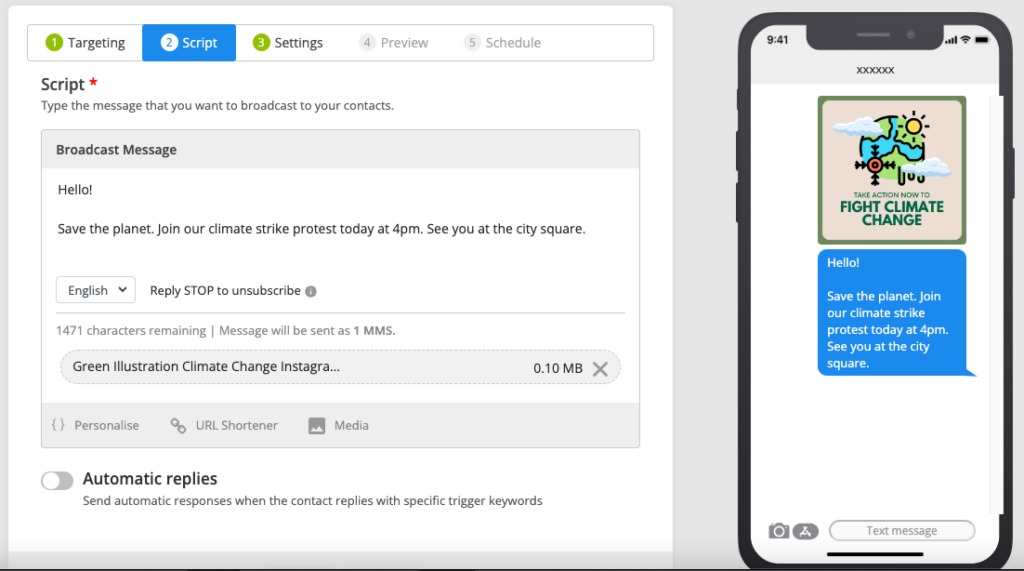
You can see a preview of your message and media file on the right side of the CallHub dashboard.
Once you upload your media files, you can add automatic replies. Automatic replies are sent when your contact responds to your message with defined trigger keywords. This is a great option when you have included a CTA in your initial message.
For example, if you asked them to respond with ‘YES’ to your event invite, your automatic response can be to send them the address for the event and tell them their name is in the attendee list.
Review your settings.
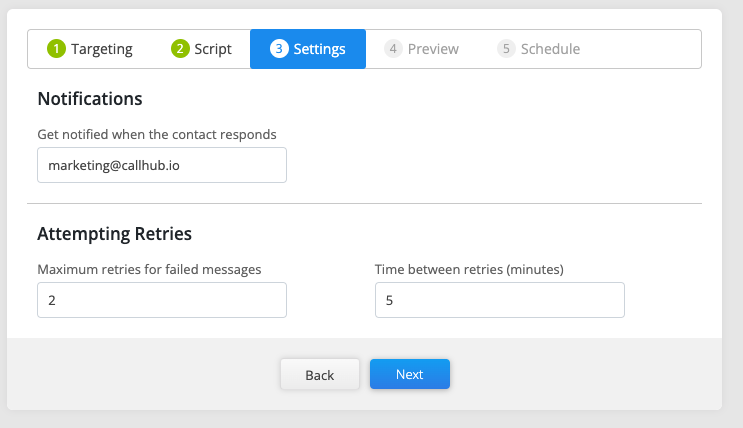
At the setting stage, you can set two features:
- Get notified by email when a contact responds to your message. Add the email address where you want to be notified. This way, you never miss a chance to engage quickly.
- If your message fails to go through initially, you can specify the number of retries and the time between each retry.
Preview your campaign.
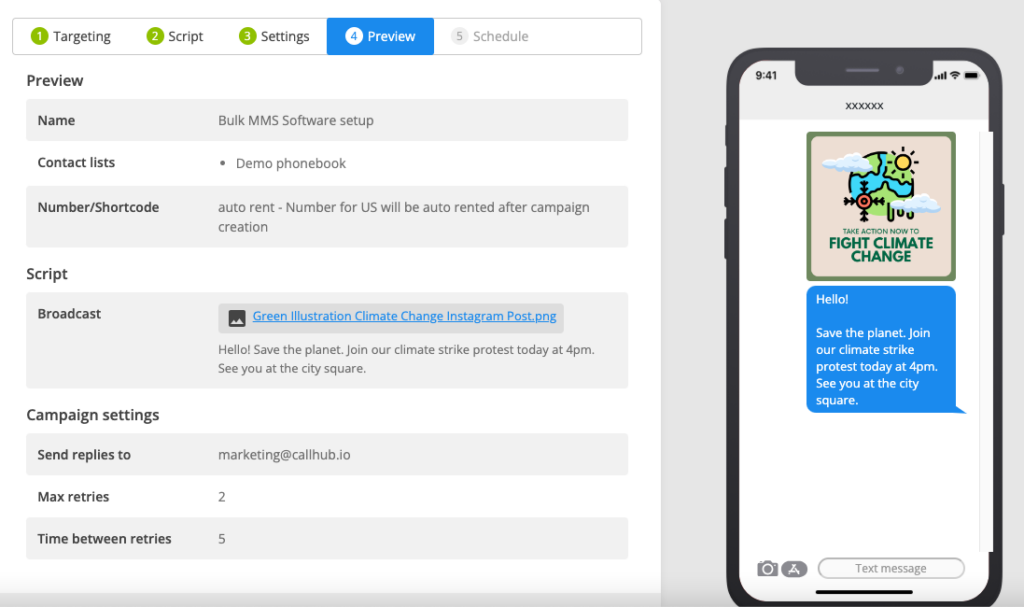
Preview all the details of your campaign and ensure you have got everything right. If you err, as humans do, you can always go back and quickly make changes.
Schedule your campaign.
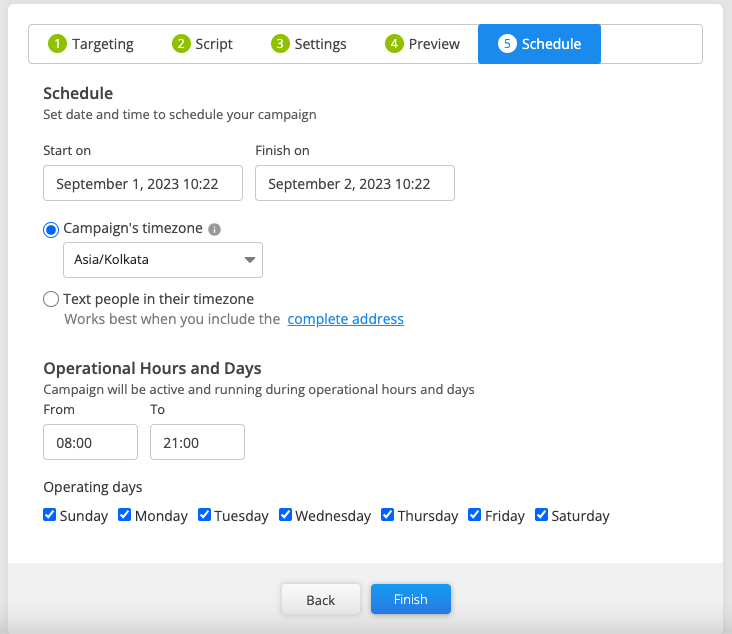
Lastly, select the dates on which you want to run your bulk MMS messaging campaign. Select your campaign’s timezone to ensure you operate only during business hours. Operating outside business hours can lead to fines. These hours vary depending on the regulations of different geographies.
Select the hours and days you want to run your campaign, and click ‘Finish’ to begin!
Analyse results.
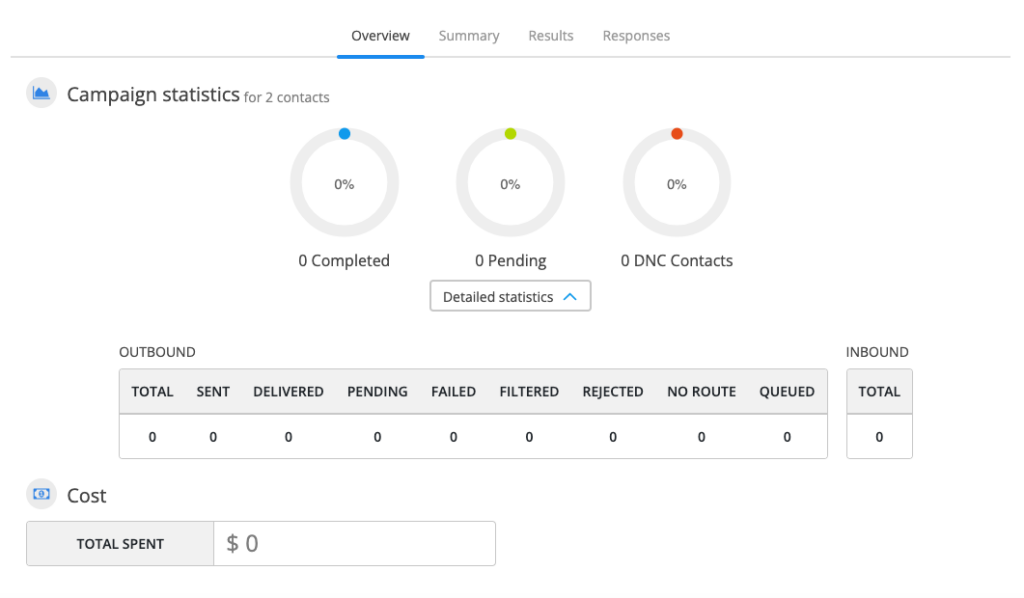
Once you click ‘Finish’, you will be redirected to this screen. You can track campaign analytics in real time to see how your bulk mms software performs.
Key features of CallHub’s bulk MMS software
Beyond sending media-rich messages, CallHub’s platform gives nonprofit marketers, campaign managers, and organizers a full suite of tools:
| Feature | What it does for your campaign |
| Personalization with merge tags | Address every supporter by name; reference their giving history or voter status |
| Autoresponders | Trigger instant replies based on keywords (e.g., “RSVP”, “DONATE”, “STOP”) |
| URL shortener & click tracking | See exactly who clicked your links in real time |
| Contact list cleaning | Remove invalid, landline, and duplicate numbers before sending |
| CRM integrations | Sync with your existing CRM so data flows automatically |
| Real-time analytics | Track delivery rates, response rates, and opt-outs live |
| 10DLC & short code support | Ensure deliverability and compliance on every send |
| Scheduling | Queue campaigns in advance; no need to be online when they send |
More ways to use bulk MMS messaging
The possibilities for your bulk MMS campaigns are nearly unlimited. Here are additional use cases across your target audiences:
- Event promotion — Replace costly postcards with MMS invites. Link to an RSVP page and track responses.
- Product and sale announcements — Send an announcement MMS that visually highlights your offer.
- Emergency alerts and urgent updates — A visual alert grabs attention faster than plain text in a crisis.
- Fundraising deadline countdowns — Pair a deadline reminder with a matching gift image to drive last-minute gifts.
- Welcome messages — When a new supporter opts in, greet them with a branded welcome MMS that shows who you are.
Getting started with a bulk MMS software
Ready to begin your MMS campaign? Start by trying out a bulk MMS software that–
- Complies with regulations,
- Provides support tools,
- Can be used for any type of text messaging such as P2P, text broadcasts, and text opt-ins.
Try CallHub’s bulk MMS software or get in touch with one of our experts to start in the right direction.
Featured Image Source: Roman Pohorecki
FAQs: Bulk MMS software
1. What is bulk MMS software, and how does it work?
Bulk MMS software lets organizations send multimedia messages—like images, videos, audio, or PDFs—to many contacts at once. You upload your contact list, create a message with media, and send or schedule it through a web-based platform.
2. What are the compliance requirements for sending bulk MMS messages?
You need explicit consent from recipients (opt-in), a clear opt-out option, and a registered number (10DLC or shortcode) to comply with rules like the TCPA in the US.
3. How do I build an opted-in contact list for MMS campaigns?
Collect phone numbers at events, through web forms with SMS opt-in, or by running a text opt-in campaign. Always make sure contacts know they’re agreeing to receive MMS messages.
4. Can I integrate bulk MMS software with my CRM or advocacy tools?
Yes, many platforms (including CallHub) offer integrations with popular CRMs and advocacy tools. This makes it easy to sync contacts and track engagement.
5. What should I do if my MMS messages aren’t being delivered?
Check that you’re using a registered number, your media files meet size limits, and your contacts have opted in. Also, make sure recipients’ devices support MMS.
6. How much does an MMS cost?
On CallHub, MMS texts cost $0.048/text.