
Most GOTV plans treat email as the channel you check off because it’s cheap and easy. Send a blast the week before Election Day, maybe another the morning of, and call it done. That approach works if your goal is sending email. It doesn’t work if your goal is turning people out.
A working Get Out The Vote (GOTV) email strategy starts 14 days out, targets confirmed supporters only, and does one specific job: Confirming voting plans. Not persuading. Not fundraising. Not announcing. Campaigns that get this right use GOTV email as the logistics layer that reduces how many calls their phone bank has to make in the final sprint. Campaigns that get it wrong are sending their tenth fundraising ask when they should be sending polling place hours.
According to NGP VAN’s GOTV framework, campaigns should aim for 3–5 touches per supporter across all channels in the final 10 days before Election Day. Email is one of those touches. Its job is not to replace phone banking or texting. Email handles the informational work so callers and texters can focus on the commitment-getting that email cannot do alone.
This guide covers how GOTV email differs from regular campaign email, the full 14-day sequence, subject line templates for each send, and how to build and sync the workflow before Election Day.
Key Takeaways
A working GOTV email strategy starts 14 days before Election Day, targets only confirmed supporters, and has one job: confirming voting plans rather than persuading, fundraising, or announcing.
Purpose and tone
- GOTV email targets confirmed supporters only, people who already said yes on a call, at a rally, or through a volunteer form, since persuasion work is already finished by this stage.
- The email’s single ask is a voting plan commitment covering polling place, early voting window, closest drop box, and required ID, not a donation.
- Effective GOTV emails read like a checklist from a friend rather than a campaign broadcast, using short sentences, one clear ask, and no fundraising footer.
What the research shows
- Mass email sent to a cold or mixed list produces no statistically significant effect on voter turnout when used as a standalone channel.
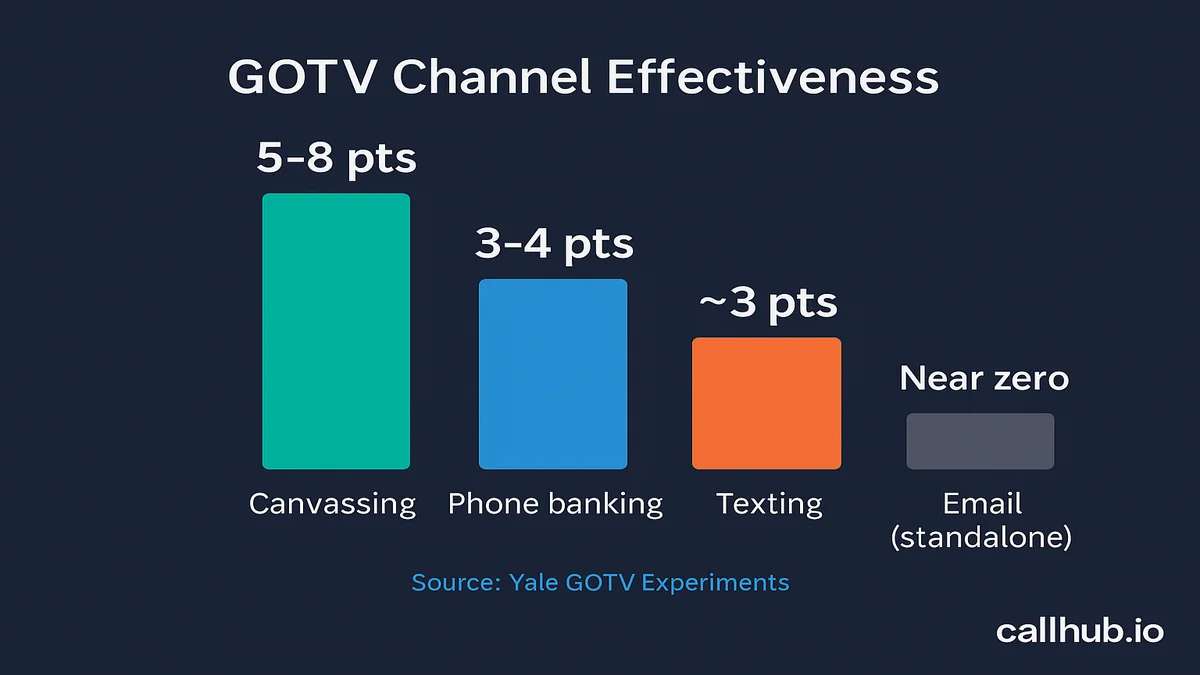
- Yale GOTV experiments show canvassing lifts turnout by 5 to 8 percentage points, phone banking by 3 to 4 points, and texting by roughly 3 points.
- Email’s standalone turnout lift is near zero, but within a targeted multi-channel sequence it handles informational load so phone and text capacity can focus on commitment-building.
- Gerber and Green’s research found phone calls cost $35 to $200 per additional vote and direct mail $59 to $200, while automated calls and email show no detectable standalone turnout effect.
Sequencing across channels
- NGP VAN’s GOTV framework recommends 3 to 5 meaningful touches per confirmed supporter across all channels in the final 10 days before Election Day.
- Email can efficiently cover two or three of those touches without consuming volunteer capacity, reducing how many calls a phone bank has to make.
- Campaigns with thin lists or tight budgets can reasonably skip GOTV email and instead rely on canvassing, live phone calls, and peer-to-peer texting to carry the full sequence.
What makes GOTV email different from a regular campaign email
The subject of most campaign emails is the campaign. The subject of a GOTV email is the voter’s next action.
That one shift changes everything about how you write them. A fundraising email needs to create emotional urgency and drive a click. A GOTV email needs to answer one question: “What do I need to do, and when, and how?” If the reader can’t answer that question in 10 seconds, the email failed.
One goal: Voting plan confirmation, not persuasion
By the time GOTV starts, you’re not trying to change anyone’s mind. You’re working from a list of confirmed supporters who said yes on a call, signed up at a rally, or clicked through a volunteer form. Persuasion is over.
Your job is to convert intention into action. That means giving supporters the specific logistical information they need: Their polling place, their early voting window, their closest drop box, and what identification (ID) they’ll need to bring. The email’s ask is a plan commitment, not a donation.
Write each GOTV email as if you’re handing someone a checklist, not a flyer.
The tone shift: From fundraising to logistics
Compare these two openers:
- Fundraising: “The race is tighter than ever. We need your support to cross the finish line.”
- GOTV: “Early voting in your county opens tomorrow. Here’s your location and hours.”
The first creates urgency. The second delivers something useful. GOTV emails should feel like the latter: A message from a friend helping you get organized, not a broadcast from a campaign headquarters.
This means short sentences, one clear ask, and specific information. No three-paragraph warm-up. No donation button in the footer. The tone shifts from “the campaign needs you” to “here’s what you need to do your part.”
When does email actually help GOTV turnout
The honest answer is: Not on its own. Research shows mass email to a cold or mixed list produces no statistically significant positive effect on voter turnout when used as a standalone channel. That finding is not a reason to skip email. It’s a reason to use it correctly.
The research on standalone email vs. sequenced email
The research on email’s limits applies to broadcast email sent to an unscreened list. If your GOTV email list includes everyone who ever signed up to your newsletter, supporters, people who clicked once two years ago, and low-propensity contacts, mass email will not move turnout numbers.
The calculus changes when you apply it to a targeted list of confirmed high-propensity supporters who are also in your phone banking and texting universes. Yale GOTV experiments show phone banking lifts turnout by 3–4 percentage points and canvassing by 5–8 points. Email’s standalone lift is negligible. But as part of a sequenced, multi-channel plan, email handles the informational load (polling place details, voting hours, plan reminders) so callers and texters can spend their capacity on commitment-building.
| Channel | Turnout lift (standalone) | GOTV role in a multi-channel plan |
|---|---|---|
| Canvassing | 5–8 percentage points | Commitment-getting, voter identification |
| Phone banking | 3–4 percentage points | Commitment-getting, ride offers, barrier removal |
| Texting | ~3 percentage points | Urgent reminders, two-way troubleshooting |
| Near-zero standalone | Voting plan logistics, polling place info, broad reminders |
Where email fits in the 3–5 touch framework
The standard target for a GOTV sprint is 3–5 meaningful touches per confirmed supporter across channels in the final 10 days. Email can cover two or three of those touches efficiently, with no volunteer capacity consumed.
Your phone banking team cannot call 20,000 people every day. Your texting program cannot handle every informational question without slowing the pipeline. Email fills that gap. It delivers voting plan information to your whole list overnight.
Think of it this way: every supporter who opens a GOTV email and confirms their voting plan is one fewer call your phone bank needs to make that day. See the complete GOTV strategy guide for how each channel fits into the full GOTV calendar.
When email is not enough: building a call + text GOTV sequence
Some campaigns skip GOTV email entirely, and the data supports that as a reasonable call if your list is thin or your budget is tight. Gerber and Green’s research in Get Out the Vote: How to Increase Voter Turnout found that phone calls cost $35 to $200 per additional vote and direct mail $59 to $200, while automated calls and email showed no detectable standalone effect on turnout. If email isn’t part of your plan, canvassing, live phone calls, and peer-to-peer texting have to carry the full sequence instead.
The three channels that replace email
- Door-to-door canvassing. The highest per-contact lift of any GOTV channel (see the does GOTV work research breakdown). Gerber and Green found it consistently the most effective mobilization method, largely because it’s a face-to-face conversation rather than a broadcast message. It doesn’t scale to every list, but for your highest-priority supporters it does the job email can’t. For door-knocking scripts and shift structure, see the complete canvassing guide for GOTV.
- Live phone calls. CallHub’s phone banking software lets volunteers reach a full contact list from any browser and log responses in real time, covering the ground an email-free plan needs. Personalized, unhurried calls consistently outperform generic scripts.
- Peer-to-peer texting. A two-way conversation from a real volunteer, not a broadcast blast, replaces the reminder and confirmation role email would otherwise play. See the GOTV texting strategy guide for the full sequence.
Building the sequence without email
Map the same 3–5 touch framework onto calls and texts instead of email: an early call or text to confirm a voting plan, a mid-window canvass or call for your highest-priority supporters, and a final 72-hour push of texts and calls that mirrors the urgency-send timing in the email sequence below. The suppression logic stays identical too. Anyone who confirms a plan or gets marked “Already Voted” on a call should drop out of your texting and canvassing queues the same way they’d drop out of an email sequence.
If your list has strong deliverability and engagement, email remains the cheapest way to cover the informational load. If it doesn’t, or you’re running a smaller, volunteer-heavy campaign, calls and texts alone can carry a full GOTV sequence.
The 14-day GOTV email sequence
The GOTV phase typically starts 7–10 days before Election Day for general elections, and 2–3 weeks out in early-vote or mail-heavy states (NGP VAN GOTV Guide). A 14-day sequence gives you enough runway to drive early vote, handle logistics, and run Election Day sends without compressing everything into the final 72 hours. For the week-by-week schedule this sequence slots into, see the GOTV timeline guide.
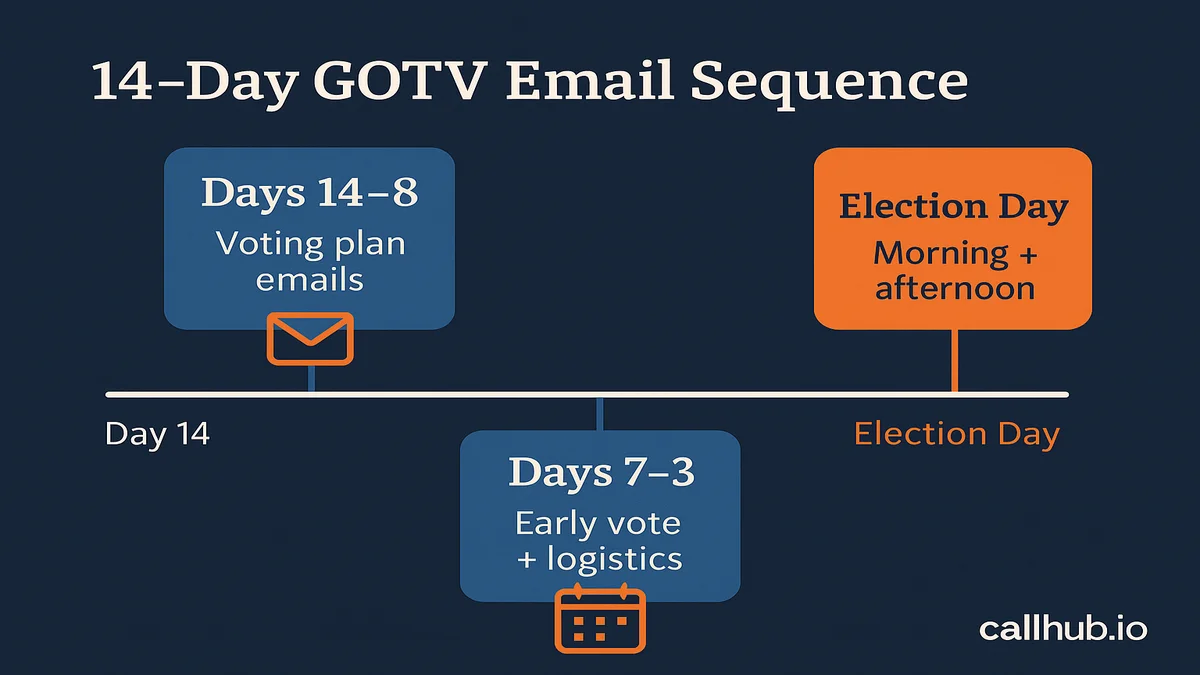
Days 14–8: Voting plan emails
This window is about getting supporters to commit to a voting plan before the final sprint starts. Your message in this phase asks: “Have you figured out when and how you’re voting?”
- Day 14: Intro send. Early voting dates and registration deadlines in your state. Subject line: “Your voting checklist for the November election.”
- Day 10: Polling place send. Link to their specific location. Subject line: “Your polling place for Tuesday: Confirm before the crowds.”
- Day 8: Early vote reminder. Specific hours and locations, plus what ID they need to bring. Subject line: “Early voting is open. Here’s what to bring.”
Keep these emails short: 80–120 words of body text, one link, one ask. Voters who receive voting plan information at this stage are less likely to face unexpected barriers on Election Day.
Days 7–3: Early voting and logistics emails
Early voting is open in most states during this window, and you want as many supporters as possible to cast early ballots. This is the most active phase of the sequence, and it should run alongside whatever early-vote calling and texting push you’re already running — see the early voting GOTV guide for how to build that parallel universe.
- Day 7: Early vote push. Lead with the number of days left. Include a map link.
- Day 5: Check-in send. “Have you voted yet?” Keep it to two sentences and a link.
- Day 3: Logistics reminder. Absentee ballot deadlines, drop box locations, what to do if there’s a problem at the polls. Subject line: “3 days left. Here’s your voting checklist.”
A 77% majority of voters say mail is a helpful resource for learning voting deadlines and timelines, according to research cited by Arena Wins on direct mail effectiveness. Email delivers that same informational function digitally, at a fraction of the cost and with same-day delivery.
Final 72 hours: Urgency sends
The final three days before Election Day shift the tone from informational to motivational. Supporters who haven’t voted yet need a direct push.
- Day 2: Short and personal. “It’s almost time. Here’s your plan for Tuesday.” Aim for 50–70 words.
- Day 1 (Election Eve): Countdown reminder. Polls open tomorrow at the listed time. Include the supporter’s polling place one more time.
Keep these emails tight. The reader already has the logistics. They need a reminder, not a lecture.
Election Day: Morning push and afternoon nudge
Election Day email has two jobs: Wake up early-morning voters, and catch afternoon stragglers before polls close. For the full day-of operation these sends plug into, including shift structure and precinct tracking, see the election day GOTV playbook.
- Morning (7–8 AM): “Today is Election Day. Polls are open until 8 PM. Here’s your polling place.” Three sentences maximum, update the closing time to match your state.
- Afternoon (1–2 PM): “Polls close in a few hours. Have you voted?” Send this only to contacts who did not open the morning email, if your platform supports suppression by open status.
Do not send more than two emails on Election Day. More than two risks complaint rates that flag your sending domain and suppress deliverability when it matters most.
GOTV email templates: What to write for each send
Three elements drive whether a GOTV email earns a read and drives action: The subject line that earns the open, the body copy that delivers a single ask, and the from name that signals the stakes.
Subject line formulas that get opens
Subject lines for GOTV emails should be specific and logistical, not urgent in a fundraising way. The formulas that work:
- Location plus deadline: “Your polling place for November 5th: Confirm before Tuesday”
- Time-specific: “Early voting closes Friday. Here’s where to go.”
- Named ask: “Sarah, have you voted yet?”
- Checklist format: “Your voting checklist for the November election”
- Countdown: “48 hours left. Have you made your plan?”
- Direct question: “Have you figured out when you’re voting?”
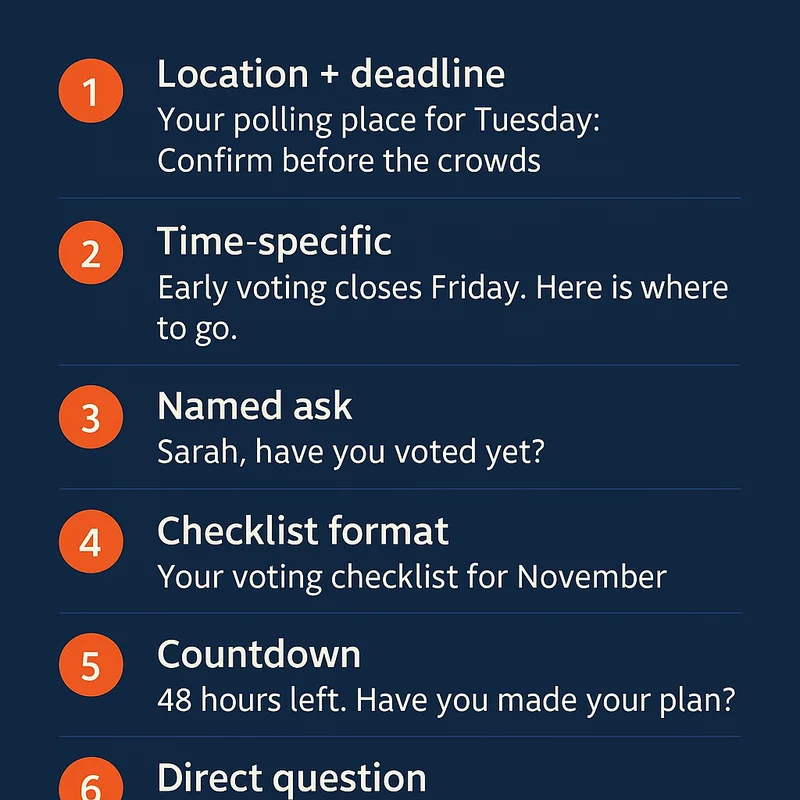
Notice what’s absent: “Last chance,” “URGENT,” “We need you,” or any fundraising language. GOTV subject lines that mimic fundraising emails get filtered by supporters who are already tuning those out.
Body copy: Short, direct, one ask
A GOTV email body should answer “what do I need to do?” before the reader has to scroll. The standard structure:
- One sentence of context: Why you’re writing right now.
- One specific piece of information: Polling location, voting hours, ballot deadline.
- One clear ask: “Can you vote early this week?” or “Reply YES if you’ve already voted.”
- One link: To a polling place finder, your voting plan tool, or your canvass signup.
That’s it. No second ask. No donation reminder in the footer. No event invitation appended. The brevity is intentional. GOTV email competes with every other email in the supporter’s inbox, and the one that gets read is the one that looks like a short, useful message rather than another campaign pitch.
From name: Candidate, campaign, or staffer?
GOTV emails sent from the candidate’s personal name typically outperform emails from the campaign name. The reason: A named personal sender reads as lower-volume communication, not a campaign broadcast.
Apply this from-name progression:
- Days 14–3: Campaign name or state director’s name. These sends are logistical.
- Day 2 and Election Eve: Candidate’s first name or full name. Personal and high-stakes.
- Election Day morning: Campaign name or field director’s name. The morning send is logistical.
- Election Day afternoon: Candidate name only. This is the personal final push.
If your platform supports from-name split testing, run a test on Day 10 and apply the winning sender to the Election Day sends.
Setting up your GOTV email sequence in CallHub
The setup takes less than an hour and runs automatically from Day 14 through Election Day with no manual sends required after activation.
Building the workflow: Automating sends by day
In CallHub’s email marketing software, you set up the GOTV sequence as an automated workflow with a start date trigger.
Steps to set up the sequence:
- Go to Email Campaigns and select “Create Automated Sequence.”
- Set the trigger to “Enrolled manually” or sync from your voter file tag for confirmed supporters.
- Add each send as a step in the sequence with the day offset from start date (Day 0 equals 14 days before Election Day).
- Set send windows: No email before 8 AM or after 8 PM local time.
- Review the sequence against your phone banking calendar before activating. Remove any days where a full phone bank or canvass push is already covering that contact directly.
Once the sequence is live, new contacts added to the confirmed-supporter segment enter automatically and receive the remaining sends.
Segmenting your list: Confirmed supporters only
GOTV emails should never go to your full email list. The correct segment is:
- Confirmed supporters who completed voter identification contact
- Contacts tagged as “Supporter” or “Strong lean” in your voter file
- Volunteers and donors who confirmed active support in the current cycle
Do not include: Persuasion targets, anyone who has unsubscribed from campaign email, or anyone whose vote intent is unconfirmed. Sending GOTV email to the wrong segment generates complaint rates that can get your sending domain flagged before Election Day.
Syncing your email list with your phone banking list
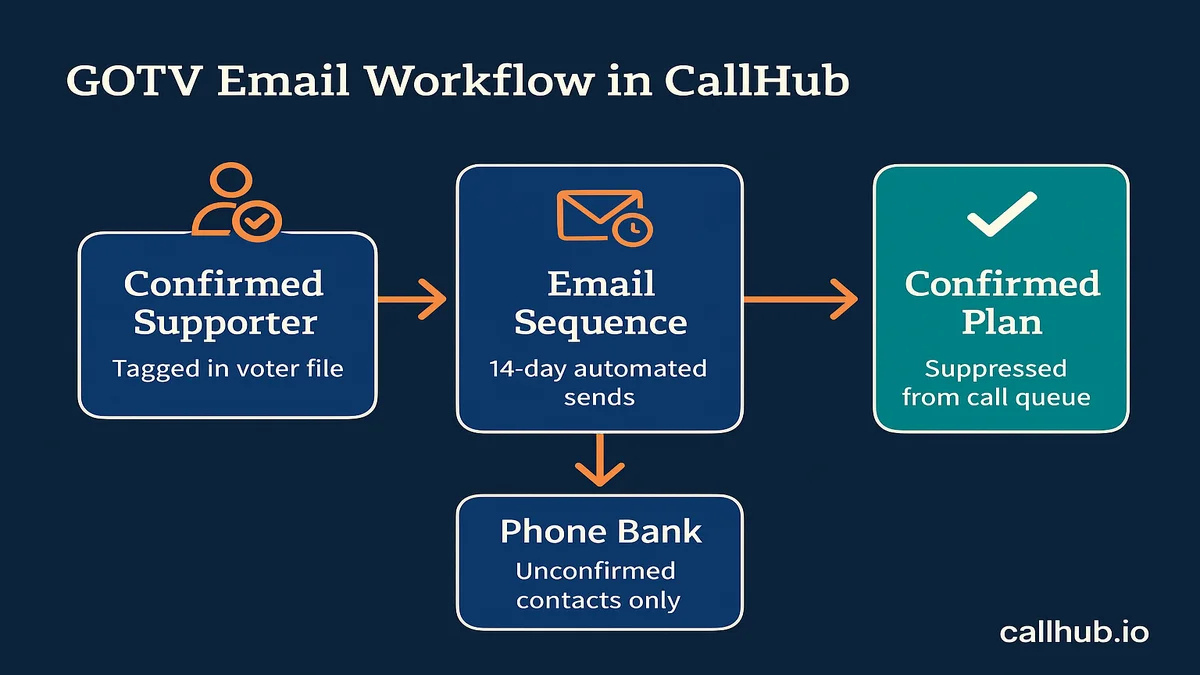
The most valuable integration in CallHub is the sync between your email sequence and your phone banking contact list. When a supporter responds to a GOTV email with a voting plan confirmation, that contact should exit the calling queue.
To set up this sync in CallHub:
- Create a “Confirmed Plan” tag on your email contacts.
- Set up a sync rule that exports contacts with that tag to your voter file.
- Update your phone banking contact list to suppress anyone tagged “Confirmed Plan.”
- Run the suppression update before each calling shift.
This prevents your phone banking team from calling someone who already told you they have a plan. It also reduces your calling universe, which means each shift covers more unconfirmed contacts per hour. See the GOTV phone banking guide for how to structure the calling side of this workflow.
Coordinating email with phone banking and texting
A multi-channel GOTV plan works when each channel is doing a different job. The biggest coordination mistake is using all three channels for the same message on the same day, which wastes capacity and trains your list to ignore everything.
What email does that phone banking cannot
Email delivers information at scale overnight, with no volunteer capacity required. No one has to be awake and available for your supporters to read a 9 PM GOTV email. Phone banking cannot do that.
Here is how the channel split works in practice:
| Channel | Best for | Timing |
|---|---|---|
| Voting plan info, polling place details, broad reminders | 14 days out through Election Day morning | |
| Phone banking | Commitment-getting, ride offers, addressing specific barriers | Days 7–1 |
| Texting | Urgent reminders, two-way troubleshooting, real-time updates | Days 3 through Election Day afternoon |
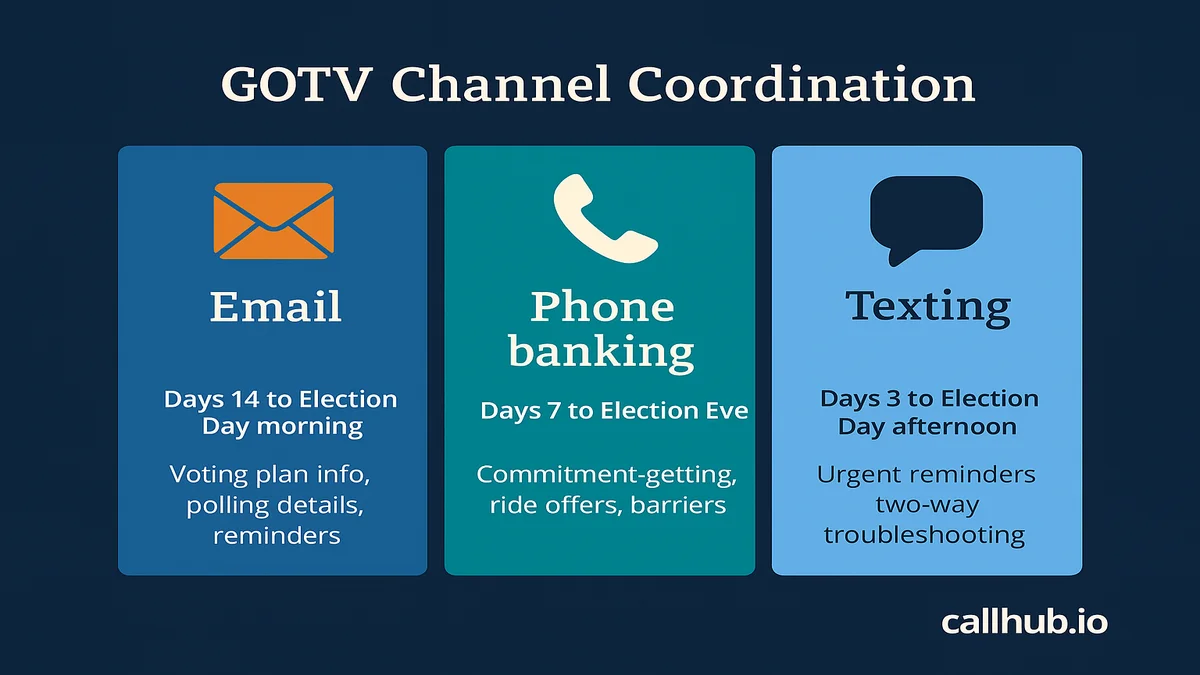
96% of text messages are opened within the first five minutes, according to industry benchmarks cited by Arena Wins. That makes texting the right channel for Election Day afternoon pushes where speed-to-open matters. Email handles the longer lead time and the overnight informational window. See the GOTV texting strategy for how to build out the texting side of this plan.
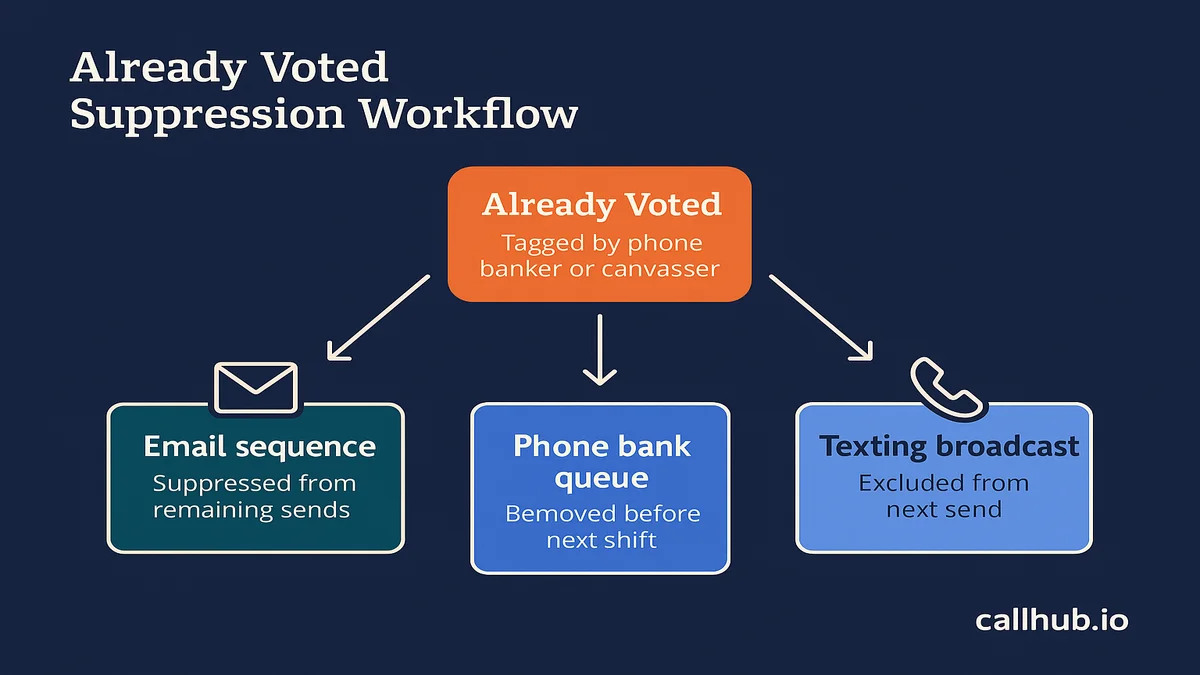
Remove already-voted contacts across all channels
The fastest way to waste GOTV capacity is to keep contacting people who already voted. It damages sender reputation, frustrates supporters, and burns volunteer time on completed work.
To remove already-voted contacts in CallHub:
- Create an “Already Voted” tag in your customer relationship management (CRM) system.
- Add contacts to that tag when a phone banker or canvasser marks them as voted.
- Set a suppression rule in your email sequence: Contacts with the “Already Voted” tag skip all remaining sends.
- Sync the suppression list to your texting broadcast before each send window.
- Review your calling queue daily and remove “Already Voted” contacts before each shift begins.
The best GOTV tools for campaigns covers how to structure your full GOTV stack, including the voter file sync that makes this suppression workflow run automatically.
Start your GOTV email sequence before the final sprint
Email is one layer of a much bigger operation. For the full phase-by-phase system, from building your voter universe through Election Day, see the full GOTV playbook.
Email’s window of usefulness in a GOTV operation is the two weeks before Election Day. Once you’re inside 72 hours, email is supporting the phone banking and texting push, not leading it. That means the sequence needs to be built, tested, and live before your team is deep into the field sprint.
The organizers who get the most out of GOTV email are the ones who treated it as infrastructure rather than an afterthought. They built the sequence in CallHub at the same time they were building the phone bank calendar. They wired up the suppression logic. They tested the from-name variants. By the time the final 72-hour push started, the email side was running on its own and the team could focus entirely on calling and canvassing.
If you have an election in the next 30 days, the sequence in this guide is your starting point. Build it in CallHub’s email marketing software and connect it to your phone banking operation through the same contact list. That connection, between who you’ve emailed, who’s confirmed a plan, and who your callers still need to reach, is what makes multi-channel GOTV actually work. It’s the same coordination CallHub’s GOTV platform is built to run end to end, across email, calling, and texting.
Frequently asked questions about GOTV email
What should a GOTV email say?
A GOTV email should answer one question: “What does this supporter need to do to cast their ballot?” The content shifts by phase. Early sends cover voting plan confirmation and polling location. Late sends and Election Day emails shift to urgency reminders: Polls are open, here is your location, here is what to bring. Keep body copy under 150 words and include exactly one link per email.
How many GOTV emails should you send?
A full 14-day sequence typically includes 7–9 sends from 14 days out through Election Day. The final two days should include no more than two emails per day. Sending more than two emails in a 24-hour window risks complaint rates that can flag your sending domain and suppress deliverability on Election Day itself.
What is the best time to send a GOTV email?
For the 14-day sequence, send between 7 and 9 AM to catch commuters, or between 6 and 8 PM for evening reads. On Election Day, send the morning email between 7 and 8 AM to match poll open times, and the afternoon nudge between 1 and 2 PM, well before polls close.
Should GOTV emails come from the candidate or the campaign?
Both, at different points. Logistical sends (polling place info, voting deadlines) perform well from the campaign name or a field director’s name. Personal urgency sends (Election Eve, Election Day afternoon) should come from the candidate’s name. The closer to Election Day, the more personal the from-name should be.
How do you coordinate GOTV email with phone banking?
The key mechanism is suppression: Anyone who confirms a voting plan through email should be removed from the phone banking call queue, and anyone marked “Already Voted” by a phone banker should be suppressed from future email sends. In CallHub, this sync runs automatically when you tag contacts and connect your email sequence to your contact list. See the GOTV phone banking guide for the full two-way sync setup.
How early should you start GOTV emails?
For general elections, start the sequence 14 days out. In states with early voting that opens two or three weeks before Election Day, start earlier to drive early vote. In mail-heavy states, push the voting plan emails out further since ballot return deadlines can precede Election Day by 7–10 days. The rule: Your sequence should begin before early voting opens, not after.