


Table of Contents
Most nonprofits already know they should be texting their supporters. The case for SMS is settled: mass text messaging for nonprofits are read within five minutes by roughly 90% of recipients, a rate no email list can touch. The harder question is not whether to text, it’s which platform keeps you legally compliant and which campaign formats actually produce donations, volunteer sign-ups, and event attendance.
This post covers both. You’ll find the compliance requirements that trip nonprofits up most often, a practical framework for evaluating texting platforms, and three campaign templates you can adapt and send this week.
Mass texting for nonprofits: What do they use texting for?
Mass texting for nonprofits earns its place across three core nonprofit activities. Each has different timing, audience, and message requirements, which is why platform choice matters more than most organizations realize.
- Volunteer coordination
Text is the fastest channel for:
- last-minute shift reminders,
- location changes, and
- day-of logistics.
Mass texting for nonprofits provides instant updates on schedules, open roles, and last-minute changes, delivered directly to volunteers’ phones where they’re most likely to see them. Two-way texting also allows for quick confirmations and feedback, so coordinators spend less time chasing responses via email and phone.
- Fundraising asks
SMS fundraising performs best during:
- time-limited campaigns,
- giving days,
- matching gift windows,
- year-end pushes, and
- sending thank you messages.
The American Red Cross puts this well: after one first-time donor received a thank-you text, they shared on Reddit.
“I got this text message from the Red Cross today. It was my first donation, and it made me feel so happy! Take care, everyone, ❤️”
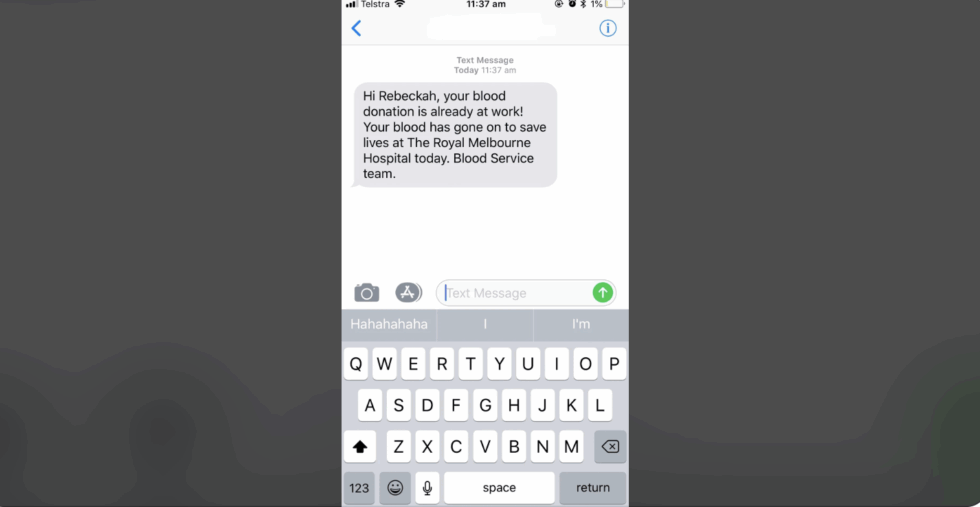
Image Source: Reddit
- Event reminders and RSVPs
Automated text reminders reduce no-shows by giving attendees a frictionless way to confirm attendance. Most people do not skip events intentionally; they forget, lose the details, or simply do not see the email buried in their inbox.
A text lands directly on their phone, takes 3 seconds to read, and can include everything they need: date, time, location, and a single reply to confirm. That removes the friction that turns registered attendees into no-shows.
Mass text messaging for nonprofits: What compliant texting looks like
This is the section most nonprofits and development managers lose sleep over. The rules are specific but not complicated once you understand what each one requires.
- What counts as valid consent for text messaging (and what doesn’t)
“Prior express written consent” is the legal standard under the Telephone Consumer Protection Act (TCPA). In basic English, it means a supporter has actively agreed, in writing, to receive text messages from your organization, and that agreement has to be specific to texting only.
Here is where nonprofits most commonly get this wrong:
- Someone donated online. Does that give you consent to text them? No. A completed donation form is not consent to text unless the form includes an explicit, unchecked SMS opt-in checkbox with clear disclosure language. Pre-checked boxes do not count.
- Someone signed up to volunteer via a web form. Same answer. A volunteer registration is not SMS consent. The form has to explicitly state that they agree to receive text messages.
- Someone texted a keyword to opt in. Yes. This is valid consent. The act of mass text messaging for nonprofits is a written agreement.
- Someone signed a paper petition at an event. No. A signature on a petition does not equal SMS consent unless the petition text explicitly states that the signer agrees to receive texts.
Here is what a valid opt-in form looks like:
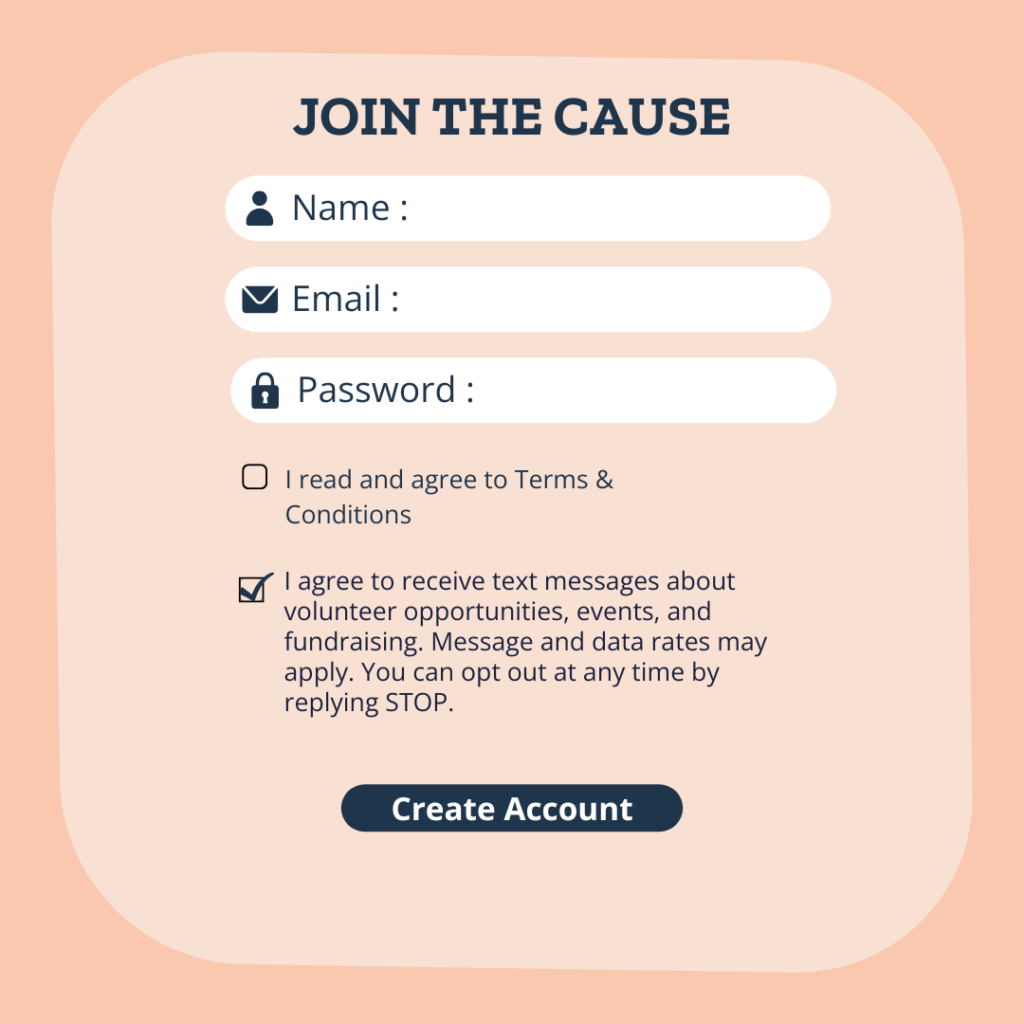
Nonprofits are exempt from some Do‑Not‑Call restrictions and don’t always need written consent—oral or implied consent (like submitting a phone number during signup) often suffices for informational texts.
- What a compliant opt-in message looks like
When someone opts in via keyword, your first response back should confirm the subscription and include all required disclosures. Here is a standard-compliant confirmation message:
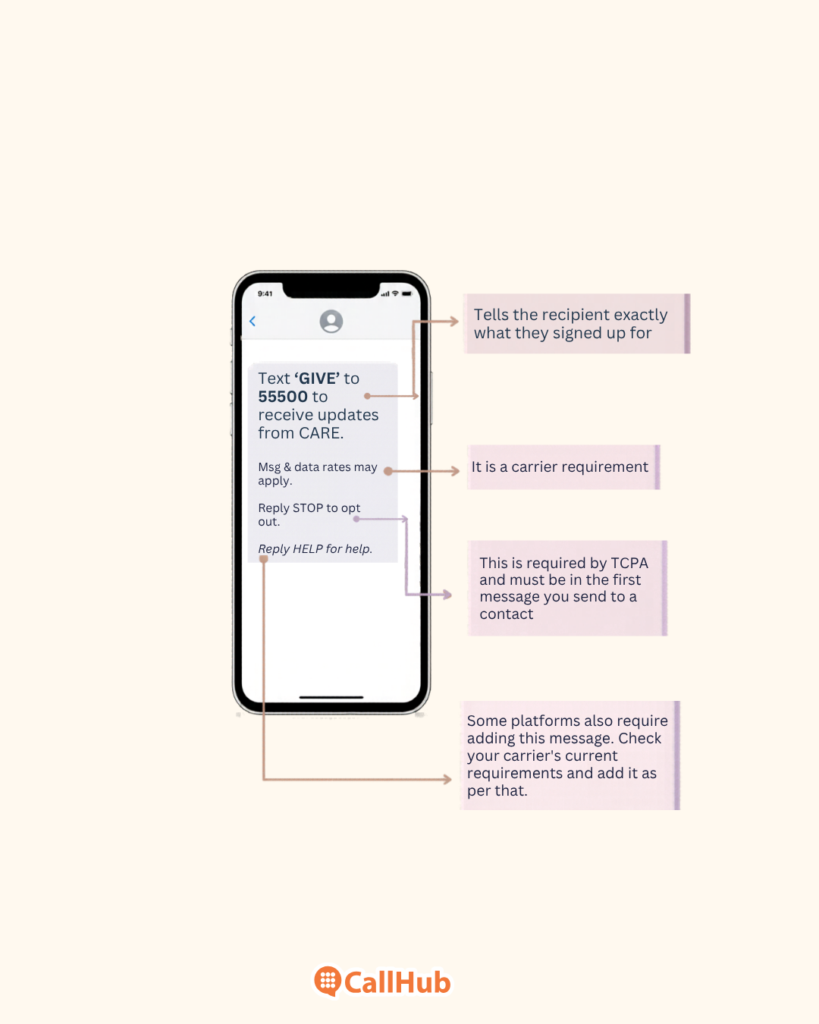
- What 10DLC means for nonprofits, and why skipping it kills your deliverability
10DLC (10-digit long code) is the carrier registration system that governs business text messaging in the United States. Since 2023, any organization sending mass texts from a 10-digit number without registering their campaign and brand will have their messages silently filtered or blocked by carriers.
You will not receive any error message. Your campaign appears to have been sent successfully, and nothing arrives on the other end.
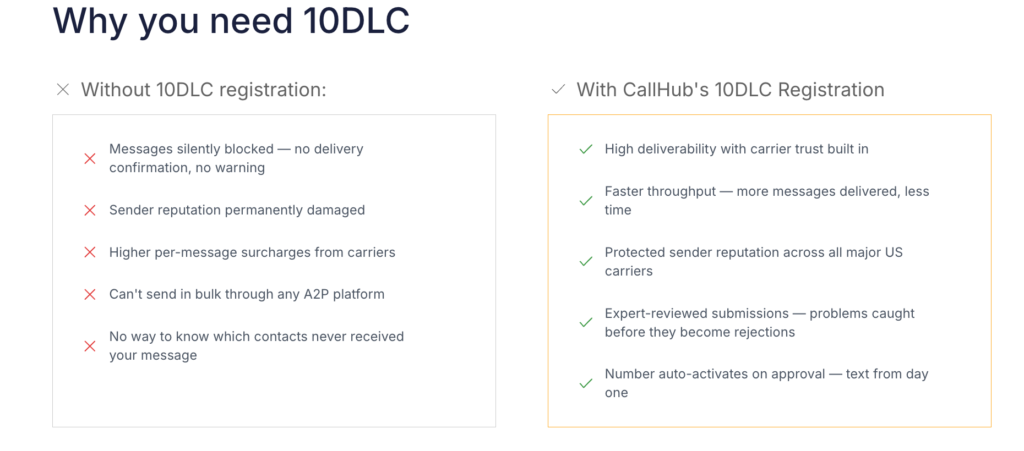
Registration requires nonprofits to submit these things:
- Your organization’s details
- Use case (nonprofit outreach, fundraising, etc.)
- Sub-use case details
- Campaign description, and
- Sample messages to a third-party registry.
| NOTE: Approval for standard nonprofit campaigns typically takes 1 to 3 weeks |
But for some use cases, campaigns can take longer, so register well before your campaign launch date (not the week of).
CallHub registers your 10DLC number on your behalf and notifies you when approval is received, removing the technical barrier for organizations without IT staff.
4. List hygiene: The compliance risk most nonprofits overlook
Sending to a stale list creates two separate problems.
- The first is legal: If a contact has changed phone numbers, their old number may now belong to someone else. Texting that person, who never consented, is a TCPA violation.
- The second is deliverability: High opt-out rates signal to carriers that your messages are unwanted, which progressively damages your ability to reach anyone on your list.
So, how to work with bad lists and re-enrich them?
Scrub your text list at least every 6 to 12 months. Contacts who have not engaged in the previous twelve or more months should be suppressed, not deleted.
Read also: Understanding List Segmentation: A Beginner-Friendly Guide
| What does suppression do? It preserves a record that you stopped contacting, which matters if you ever face a complaint. |
One more thing: An export from your donor CRM is not automatically a clean text list. Your CRM holds whoever donated. Your text list should hold only contacts who explicitly consented to SMS. These are almost never the same group.
What to look for when choosing a mass texting platform
Every outreach platform in the market will tell you it supports nonprofits. These are the specific questions one should look for in a software that is capable of solving problems.
- Does it handle 10DLC registration for you, or do you do it yourself?
Some platforms register your campaign on your behalf during onboarding. Others hand you a form, point you to the carrier registry documentation, and leave you to it. For most nonprofits without dedicated technical staff, self-serve registration is a meaningful barrier and a real compliance risk if any field is filled in incorrectly.
| CallHub handles the registration process for you. Just fill in your nonprofit details (as explained in the blog), and your submission is sent directly to the carrier registry. After registering your use case, you’ll need to wait for approval before you can rent and use a 10DLC number for campaigns. Here is how CallHub’s 10DLC registration process works: 1. First is Brand Registration — your business details are submitted to The Campaign Registry and then vetted by Aegis Mobile for approval. 2. Once approved, you move to ‘Use Case Registration’, where you submit details like campaign category, sub-use case, message samples, opt-in workflow, and MMS media (if applicable) before final submission. |
- Can it segment your list by supporter type?
The three main categories of people in a nonprofit are:
- Donors
- Volunteers, and
- Event attendees
All three of these need different types of messages.
A fundraising ask sent to someone who has only ever signed up to feel out of place, they have no giving history with you, and the ask can feel presumptuous. You send enough of those, and people stop reading your texts altogether.
A platform that cannot segment your list is not the one you’re looking at. That means your donors get volunteer scheduling texts, your event attendees get donation asks, and nobody gets a message that actually fits where they are in their relationship with your organization.
| On CallHub, you can create segments in three ways: Tags, Custom fields, and Contact lists. If a volunteer donates, they automatically move into the right segment without a manual re-import, as set up in CallHub’s workflow. |
3. Does it support two-way mass text messaging for nonprofits, or is it broadcast only?
One-way text broadcasts work well for event reminders and donation asks. But more nonprofit campaigns now require real replies for:
- RSVP confirmations
- Volunteer questions
- Donor follow-ups where a form response is not enough.
A broadcast-only platform cannot handle these without a clunky workaround, typically routing replies to a shared inbox that nobody owns.
| CallHub’s peer-to-peer texting routes messages through individual staff or volunteer senders, enabling real two-way conversations at scale, useful for RSVP confirmations or major donor follow-ups where the message needs to feel personal. |
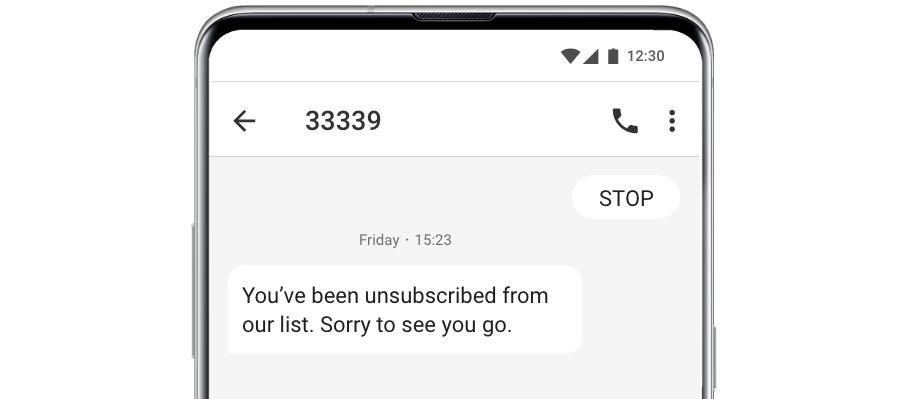
- How does mass text messaging for nonprofits handle opt-outs?
There are two ways platforms handle STOP replies:
- Automatic removal and
- Manual removal.
Manual removal means a staff member has to process each opt-out request. That is slow, error-prone, and a TCPA violation waiting to happen if someone gets texted after opting out because the request sat in a queue.
Automatic: With CallHub, you can automatically remove contacts who reply with a STOP and suppress them across all future campaigns for the campaigns they opted out of.
- Does it integrate with your CRM?
If every campaign requires a manual export from your CRM and a manual import into your texting platform, your contact data goes stale fast, and staff hours disappear into admin work. CRM integration means your send list stays up to date without extra steps.
| CallHub connects directly with EveryAction, NationBuilder, Blackbaud, and Salesforce. Your CRM list becomes your send list without a manual export. |
Read also: Why You Need Customer Relationship Management Software
Three nonprofit text campaigns that consistently work
These templates are based on the campaign types that consistently produce the highest response rates for nonprofit SMS programs. Each includes two message examples and timing guidance.
- The fundraising ask
A two-message sequence outperforms a single ask. The first message goes to your active donors segment. The follow-up, sent 48 hours later, goes only to contacts who did not click (not to everyone)
Message 1:
Hi [First Name], [Org Name]’s spring campaign ends Friday. Your gift today helps us [one concrete outcome]. Donate here: [link]
Message 2 (non-clickers only, 48 hours later):
[First Name], two days left. Every dollar raised this week is matched. [link]
Timing guidance: Send Tuesday through Thursday, between 10 a.m. and 7 p.m. local time. Avoid Mondays (low engagement) and weekends (feels intrusive for most audiences).
| Set this up in CallHub as a text broadcast to your active donors segment. The follow-up sends automatically via workflow to contacts who did not click (no manual list pull is needed). |
- The event reminder
Two sends per event, 48 hours before and day-of. The day-of message should carry all the logistics a supporter needs to walk in the door.
Message 1 (48 hours before):
Hello, [First Name], you’re registered for [Event Name] on [Date] at [Time]. We can’t wait to see you. Reply Y to confirm.
Message 2 (day-of):
Hello [First Name], Today’s the day! [Event Name] starts at [Time] at [Address]. Parking is available [location]. Questions? Reply here.
The “Reply Y” in the first message gives you a real attendance signal and opens a two-way channel if someone needs to cancel or ask a question.
| CallHub’s workflow automation handles both sends. Once you set the trigger, you configure it once per event. |
- The volunteer confirmation
Send the first message as soon as someone signs up. Send the second message the day before their shift. The confirmation message should use merge tags to include each volunteer’s specific shift details. Remember, generic confirmations get ignored.
Message 1 (immediate on sign-up):
Hi [First Name], you’re confirmed for [Shift Date] at [Location] from [Start Time] to [End Time]. Questions? Contact [Coordinator Name] at [Phone]. See you then.
Message 2 (day before):
Hello [First Name], Reminder: your volunteer shift at [Location] is tomorrow at [Start Time]. Please wear [dress code if relevant] and bring [any required items]. Thanks for showing up.
| Use merge tags in CallHub to pull each volunteer’s shift time and location directly into the message, so it reads personal even at 500 sends. |
How to know if your campaigns are working
Four metrics tell you most of what you need to know. These are realistic nonprofit benchmarks based on industry data from CTIA and Mobile Marketing Association reporting:
| Metric | Nonprofit benchmark | What to do if you’re below it |
| Delivery rate | 95%+ | Scrub your list; check 10DLC registration status |
| Opt-out rate | Under 2% | Reduce send frequency; review consent collection |
| Click rate (texts with links) | 10–20% | Test message copy; check timing; shorten the CTA |
| Response rate (P2P or reply campaigns) | 15–25% | Personalize the message; reduce list size; test send time |
A delivery rate below 95% almost always points to one of two problems:
- A stale list with invalid numbers or
- A 10DLC registration issue.
Check both before changing your message.
Frequently asked questions
1. Is my existing donor list compliant for texting?
Not automatically. A donation does not equal consent to text. Unless your donation form included an explicit opt-in checkbox for SMS communications with clear disclosure language, and that checkbox was not pre-checked, you need to re-collect consent before texting those contacts.
2. How long does 10DLC registration take for nonprofits?
Typically, 1-3 weeks for standard nonprofit campaigns. Political or high-volume campaigns can take longer. Register before you need to send, not the week of your campaign launch.
Here is how CallHub’s 10DLC registration process works:
First is Brand Registration — your business details are submitted to The Campaign Registry and then vetted by Aegis Mobile for approval.
Once approved, you move to Use Case Registration, where you submit details like campaign category, sub-use case, message samples, opt-in workflow, and MMS media (if applicable) before final submission.
3. How often should nonprofits text their supporters?
Two to four times per month works for most audiences. More is appropriate during specific campaign windows, like a three-day fundraising push or a day-of event sequence. Watch your opt-out rate: above 2% is a signal to pull back.
4. What’s the difference between a text broadcast and peer-to-peer texting?
A text broadcast sends the same message, personalized with merge tags, to your full list at once, fast, high volume, and one-way by default. Peer-to-peer texting routes each message through an individual sender, enabling a real two-way conversation at scale. Most nonprofits use both depending on the campaign.